
What is the first thing you ask yourself before hiring someone new?
Most tour operators ask themselves the same 3 questions: What will this person take off my plate? How soon will they pay for themselves? And what happens if it does not work out?
Now think about the moment a tour operator software demo ends. Everything looked good, and someone asked, “But is it worth the money?”
This guide treats tour operator software like hiring a senior employee in your tour agency. You will count what it costs, count what it brings back, and see the result in one number: ROI. This guide will also help you build your own ROI sheet in 5 minutes. Figures are in INR, but the formula works in any currency, so the decision rests on your figures and not on a sales pitch.
In this blog, we answer one question: does tour operator software pay for itself or burden your existing profit?
But if you want the full buying process first, start with our guide on How To Choose Tour Operator Software?
Let’s start with the short answer.
Quick Answer: Is Tour Operator Software Worth Buying?
Yes, tour operator software is worth it when the hours, lost leads and pricing errors it removes cost more than its yearly fee. In the worked example below, a 6-person tour operator spends about ₹1.66 lakh in year one, earns roughly 113% ROI even on cautious estimates, and recovers the cost in about 6 months. That year-one cost is less than 3-4 months of one coordinator’s salary.
Good tour operator software targets exactly these, with faster quotations, a follow-up date on every lead, and profit shown on each quote before you share it. Some vendors also include data migration, onboarding and training, so ask what is covered before you sign.
The Return From Tour Operator Software Comes From Three Places
- Time Returned: Hours your team no longer spends on quotes, retyping and chasing.
- Revenue Recovered: More enquiries turned into confirmed trips.
- Money Protected: Fewer pricing errors, missed dues and last-minute fixes.
A 2019 study of travel businesses in Gurgaon, India, found that IT plays a significant role in their profitability.
There is one condition, however: The return appears only if your team uses the software every day.
So how do you turn that into a number you can trust? Let’s look at the formula.
How Do You Calculate ROI On Tour Operator Software?
ROI compares what you gain with what you spend. Forrester, a research firm that builds business cases for technology investments, defines it as net benefits (benefits minus costs) divided by costs. In simple words:
ROI (%) = (Total return – Total Cost) ÷ Total cost × 100
Say you spend ₹1,00,000 and get back ₹ 1,50,000 in value. Your net gain is ₹50,000, so your ROI is 50%.
Pause: If you spent ₹1,00,000 on software, what return would make you comfortable?
The tricky part is deciding what counts as a return. Forrester models every investment on 4 elements: Benefits, Costs, Flexibility, and Risk. It also adjusts for risk, lowering the expected benefits and raising the expected costs, so the final number is not too optimistic. And it advises readers to use their own estimates, not anyone else’s.
You can follow the same idea when you work out the ROI of tour operator software, with 3 simple rules:
Rule 1. Count profit, not sales: If you sell a trip for ₹ 2,00,000 and earn ₹ 25,000 on it, your return is ₹ 25,000.
Rule 2. Count saved time only if it is put to use. An hour saved counts only if your team spends it on selling, follow-ups or planning.
Rule 3. Count only half of what you expect. Estimates are usually hopeful, so cut yours in half. If the numbers still work, you can trust the result.
The formula needs 2 numbers, and cost is the one most owners get wrong. So let’s count it properly.
What Does Tour Operator Software Really Cost?
Remember the new hire from the start of this guide? Their salary was never the whole cost. Someone also had to train them, and their first weeks were slower. Software is no different, and most owners make the mistake of counting only the monthly subscription they are paying.
The real cost has 5 parts:
| Cost part | What it is | One-time or recurring |
| Setup fee | Charge to get your account ready | One-time |
| Recurring fee | Monthly/yearly price, often per user | Recurring |
| Data migration | Moving rates, suppliers and past trips | One-time |
| Training time | Hours your team spends learning | One-time |
| Slower first weeks | Productivity dip while the team adjusts | One-time |
Pause: Which of these had you counted before today?
Two vendors with the same monthly fee can cost very different amounts. Some include migration, onboarding and training in the price. Others charge for them separately or tie you to a long contract. So before you compare prices, ask each vendor what is covered.
Also remember that costs usually arrive before the returns do. Setup, migration and training all happen first, and your team works a little slower until they settle in. So the first months show the cost, and the returns build up after that.
That is why you should compare cost and return over a full year, and not over the first month.
Here is how it works at Sembark. You pay a one-time setup fee plus a monthly fee per user, with no long-term contract. Data migration, onboarding and training are included, so they cost you effort but no extra bill. Sembark’s AI features are optional add-ons, so ask about their pricing separately.
Now you know what goes out. Next, let’s see where the money comes back from.
Where Does the ROI of Tour Operator Software Come From?
The money comes back in 3 places. Each one has a simple formula, and you only need your own numbers to fill it in.
1. Time returned
Start with the work your team does by hand:
- Building quotes from scratch
- Retyping supplier packages into your own format
- Copying trip details from one sheet to another
- Chasing updates across chats and emails
All of this adds up. McKinsey Global Institute estimated that the average “interaction worker”, a high-skill knowledge worker such as a manager or professional, spends nearly 20% of the workweek looking for internal information or tracking down colleagues who can help with specific tasks. The study was not about tour operators, but think of the time your team spends digging through chats and sheets for a quote, a rate or a payment status.
Your formula: hours saved per week × working weeks × cost of one team hour.
2. Revenue Recovered
Every enquiry is a trip you could sell. Software helps you confirm more of them, and present each one better. Two numbers track this:
- Lead conversion rate: the share of your enquiries that become confirmed trips.
- Average trip value: how much each confirmed trip is worth to you.
Here is how software moves both numbers:
- Faster quotes: your price can reach the traveller before a competitor does.
- Steady follow-ups: fewer enquiries go quiet before they are confirmed.
- Clear, branded quotations: each trip is presented better and can be sold at a stronger value.
Your formula: extra confirmed trips per month × margin per trip × 12.
3. Money Protected
Some costs never appear as a line on an invoice. They hide in small slips like these:
- A quote sent with last season’s rate
- A tax left out of the final price
- A cab or guide booked twice, so you pay extra for a replacement
- A supplier payment that goes out late
Your formula: cost of one slip x slips per year
Now take a pause and think: Which of these three returns would matter most to you and your team?
You now have all 3 returns. Next, let’s put them side by side with the costs in one worked example.
A Worked Example: ROI for a 6-Person Tour Operator
Let’s put the costs and returns side by side. Picture a tour operator with 6 people: 3 in sales, 2 in operations, 1 in accounts. The figures given below are just round numbers for the example only, so use your own when you build your sheet.
Year-one cost: ₹1,66,000
- Setup fee: ₹40,000
- Recurring fee: ₹1,500 per user x 6 users x 12 months = ₹1,08,000
- Training Time: 6 people x 10 hours x ₹300 per hour = ₹18,000
Year-one return: ₹7,05,600
- Time returned: If each of the 3 salespeople sends 8 quotes a week and saves 1 hour on each. That’s 24 hours a week × 48 working weeks × ₹300 per hour = ₹3,45,600 a year, counted only because the team spends those hours on follow-ups and selling (Rule 2).
- Revenue recovered: 1 extra confirmed trip a month at ₹25,000 margin = ₹3,00,000
- Money protected: If 4 slips avoided which saves at least 15,000 each = ₹60,000
The result: ROI (₹7,05,600 – ₹1,66,000) ÷ ₹1,66,000 × 100 = about 325%
That looks generous, so also apply the Rule 3 (half rule) from earlier and count only half of the return, which is ₹ 3,52,800.
Cautious ROI: (₹3,52,800 − ₹1,66,000) ÷ ₹1,66,000 × 100 = about 113%
Payback time: ₹1,66,000 ÷ ₹29,400 a month = about 5.6 months
Even with the half rule, this operator earns back its cost inside the first year. But this is an example, not a promise. Your own numbers will be higher or lower, and that is exactly what your ROI sheet will show.
Now it’s your turn to fill in the numbers.
Your 5-Minute ROI Sheet
You have seen the example. Now fill in the numbers for your own business. Take a pen or open a blank note, and use your real figures, not guesses.
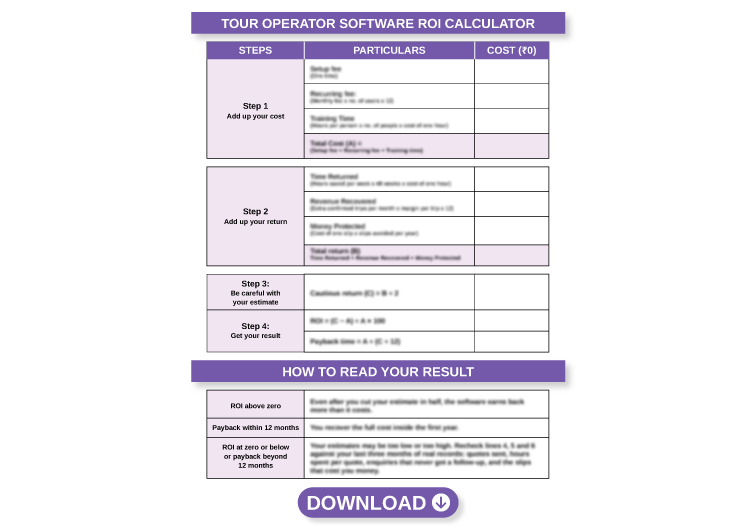
Take your filled sheet to every demo. Ask each vendor to run one of your own recent trips, and show you how lines 4, 5 and 6 would change on it. That turns your estimate into something you can see.
Not sure what to ask for in a demo? Our guide on Tour Operator Software Features: What To Look For & How To Test Them gives you a test for each one.
One last thing: a strong sheet only pays off if the software gets used every day. So let’s look at why some tour operators never see the return.
Why Do Some Tour Operators Not See ROI?
Two tour operators can buy the same software and get very different results, and the software is rarely the reason. These 4 causes come up most often.
1. Nobody owns the rollout: When no one is responsible for moving the team onto the new system, half of the work stays in old chats and sheets. You end up paying for the software while the old costs continue. Name one person to own the rollout, and give them a clear start date.
2. Training gets skipped: OECD research on firms across European countries found that digital adoption is linked to productivity gains, but the gains are weaker where skills are short. In the same way, a team that has not been trained will not get the full value of the software. Budget the training hours from line 3 of your ROI sheet, and protect them.
3. There is no plan: A 2026 Springer study looked at tourism micro firms and SMEs, using European Commission survey data. It found that both adopting digital tools and having a strategic digitalization plan improved performance, and the plan had the bigger effect on growth. Before you buy, write down the three things the software must fix first, so your team knows what success looks like.
4. Price is the only test: A cheaper tool that covers half of your workflow leaves the other half on spreadsheets, and you keep paying for that half in hours and erro₹ Compare the whole cost against the whole return, and not just the monthly fee.
Now find out: which of these four is most likely to happen in your team?
All four are easier to avoid when you know your starting point. So before you buy, let’s record it.
What Should You Measure Before You Buy?
Just like a new hire, software needs a “before” picture, or you cannot tell what it changed.
So spend 30 days noting six numbers from your own records. These are the six ROI parameters we use for tour operators, and together they show how well your business turns enquiries into trips. Each one is explained below, so you can start without reading anything else.
If you want to see them in the context of the full buying process, our guide on how to choose tour operator software covers it.
- Enquiry-to-quotation time: how long it takes an enquiry to turn into a priced, sendable quotation.
How to measure: note the time each enquiry arrives and the time its quote goes out
- Lead conversion rate: what share of your enquiries turn into confirmed bookings, rather than going cold from a missed follow-up.
How to measure: confirmed trips ÷ enquiries received.
- Repeat booking rate: whether past travellers or partner agents come back to you for future trips.
How to measure: bookings from past travellers or partner agents ÷ all bookings.
- Quotes produced per team member: how many itineraries one person can turn around in a given week.
How to measure: count the quotes each person sends in a week.
- Cost per booking: what it actually costs to close and deliver a trip, including the cleanup from booking conflicts and missed dues, not just the base trip cost.
How to measure: add the team hours spent on one trip to the cost of any fixes it needed.
- Average trip value: what each booking is actually worth, and whether better presentation and upselling raise it.
How to measure: total booking value ÷ number of bookings.
These six numbers connect to the three returns you counted earlier: time, revenue and money protected. So if your ROI sheet says you gained something, these numbers show whether it really happened.
Note the same six numbers again 30 days and 90 days after you start using the software. Put the two sets next to each other, and the difference shows what the software actually changed.
Now you know your starting point. But maybe you are still wondering: is it too late to start?
Is It Too Late for Me to Invest in Tour Operator Software?
If you have been thinking about it for a while, you may be wondering whether you have missed the right time. In most cases, you have not. Most owners wait for a quieter month, and that month rarely comes. The waiting usually comes from one of these doubts:
- “We are in the middle of the season.” A busy season means more enquiries, and that is when slow quotes and missed follow-ups cost the most. Ask each vendor how they set up your team without stopping daily work.
- “We have years of data in spreadsheets.” Your rates, suppliers and past trips are exactly what a new system needs from day one, so that history is an asset and not a reason to stay. Ask each vendor whether data migration is part of onboarding, and how long it takes.
If you are not sure your spreadsheets are still enough, our guide on the 10 Signs Your Tour Operator Business Has Outgrown Spreadsheets has a quick self-check score.
- “My team is used to the old way.” Habits take time to change, which is why training matters. Plan the training hours before the switch, so your team is ready on day one.
So is it too late? No. Fill in your ROI sheet first, and let your numbers tell you when to start.
If your sheet shows a return, the next step is to see how tour operator software can deliver it.
How Does Sembark Deliver ROI for Tour Operators?
Sembark is tour operator software for inbound & outbound operations. It manages every step of a trip, from the first inquiry to the final payment, and over 1200 travel companies across 28+ countries run their operations on it.
It is built on deep travel-operations experience, so it targets the places where tour operators lose the most: leads that go quiet, itineraries that take hours to cost, and money that slips through the cracks between suppliers and customers.
Here is how its main features connect to the three returns on your ROI sheet.
Time Returned
- Smart Itinerary Builder: Build a costed, branded quotation in 60 seconds, with Auto Tour Costing from your own rates and multi-currency support.
- Quick Amendments: Change a quote and it recalculates instantly, with a log history of every amendment.
- AI Itinerary Importer (add-on): Turns a supplier’s package into an editable quotation in under a minute. You upload a PDF, Word file or image, or paste the text or WhatsApp message, then add your price and markup and share it in your own branding.
- AI Itinerary Builder (add-on): Enter four basic details (trip purpose, tour basis, budget tier, destination-nights) and turn it into a complete itinerary automatically using your pre-loaded database.
Revenue recovered
- Auto-Lead Capture and Distribution: Captures leads automatically from Meta Ads, Google Ads, chatbots, landing pages and your website & auto distributes & assigns each lead by rules or round-robin.
- Advanced Follow-ups and Reminders: Lets you set a follow-up date on every lead and provides three-step reminders (email, in-app, mobile) with pending and overdue follow-ups on one dashboard.
- Click-to-Call & Call Tracking: Lets your team call leads in one click, logs and records every call, and turns missed calls into leads.
- AI Email Reader (add-on): Reads every incoming enquiry email the moment it lands, pulls out the quoting details automatically, and turns it into a structured lead.
- Notify (add-on): sends a WhatsApp welcome message in seconds and follows up quotations on your schedule, with every message logged in a shared team inbox against its lead or trip, plus automated quotation, voucher and payment messages.
Money protected
These features cover the slips we listed earlier: an outdated rate, a missing tax, a double-booked cab and a late supplier payment.
- Pricing & Mark-up: Sets markup and tax by component and reprices instantly when a cost changes, so the quote shows cost, markup, tax and profit before you share it.
- Smart Price Handling: Stores supplier contracts with validity dates and sets rates by season, weekday or break period, so rates stay accurate in every travel season.
- Real-time Payment Tracking: Shows received and pending payments for each trip, plus supplier payables by service, with reminders by phone, email and inside the software.
- Supplier Ledger: Keeps a live ledger for each supplier, with costs recorded from confirmed bookings, plus payments, advances and balances.
- Proforma Invoice: Creates a proforma invoice from the final quotation in one click and keeps every revision on record.
Checking your numbers
Real-Time Reports show leads, sales, follow-ups, conversions and revenue by person, team, destination or period, and you can filter and export them. Use them to compare your results with the six numbers you noted before you started.
Getting your team started
Data migration, team training and setup support are included, and most tour operators go live in under a week. Sembark gives each team role-based access, 24×7 support via WhatsApp, email or calls, and no long-term contract. Ask for a quote based on your country and team size, so you can complete your ROI sheet.
Bring your filled ROI sheet and one of your own recent trips, and we will cost it live on your rates.
Book a free 30-minute demo
Still have questions? Here are the ones we hear most.
Conclusion
At the start of this guide, we asked three things you would want to know before hiring someone new: what will they take off my plate, how soon will they pay for themselves, and what happens if it does not work out? You now have an answer to each. Your three returns show what the software takes off your plate. Your payback time shows how soon it pays for itself. And if it falls short, your downside is limited: with no long-term contract, you risk a few months of fees, not a year.
If the numbers still hold after you cut your estimate in half, you have a decision backed by your own figures, and not by a sales pitch. And if you want to see how those figures look on your own trips, bring your ROI sheet to a demo with Sembark.
FAQs
Q1. How do I calculate the ROI of tour operator software?
A. Use one formula: ROI (%) = (Total return − Total cost) ÷ Total cost × 100.
Add up your total cost for the year, including setup, recurring fees, data migration and training time. Then add up your return from time saved, extra confirmed trips and errors avoided. To stay on the safe side, count only half of your expected return. The ROI sheet in this guide walks you through each step.
Q2. How long does tour operator software take to pay for itself?
A. It depends on your numbers, and your ROI sheet gives you the answer. Payback time depends on your enquiry volume, your supplier count and how quickly your team adopts the software. To find yours, divide your total cost by one month of your cautious return. A quick rollout also helps, because returns begin only once your team goes live, and most tour operators go live on Sembark in under a week.
Q3. Is tour operator software worth it for a small team?
A. Yes, if your workload is high enough. A small team can still handle many enquiries, suppliers and payments, so what matters is your workload, not your headcount. Fill in the ROI sheet to check, and since Sembark charges a monthly fee per user with no long-term contract, a smaller team pays for fewer users.
Q4. Are there hidden costs I should watch for?
A. Yes, a few. Watch for data migration, training time, the slower first weeks, add-on pricing and low team adoption. Ask each vendor what the price includes before you compare, since some include migration, onboarding and training, while others charge for them separately. With Sembark, data migration, team training and setup support are included, there is no long-term contract, and optional AI features are priced as add-ons.
Q5. How do I know if the software is actually delivering ROI?
A. Compare your numbers before and after the switch. Before you start, spend 30 days noting six numbers: enquiry-to-quotation time, lead conversion rate, repeat booking rate, quotes per team member, cost per booking and average trip value. Note them again 30 and 90 days after go-live, and put the two sets side by side. The difference shows what the software actually changed. Sembark’s Real-Time Reports also help with the count, because they show leads, sales, follow-ups, conversions and revenue by person, team, destination or period.
Related Blogs