“Our Excel sheets and WhatsApp groups have worked fine for years, and our work is the same as before. So why do we need tour operator software? It will only add extra cost, and the daily work is getting done anyway, isn’t it?”
If you are a tour operator Inbound or Outbound, you have probably said this, or heard it from someone. And it is a fair question to ask. Spreadsheets did get you this far.
But the answer usually shows up in small moments, not big failures. A traveller messages you late at night about a 10-day trip. By the time you build the itinerary by hand and cost it in Excel the next afternoon, they may already have a quote from another operator.
And even if they wait and confirm, the work is not over. You build the quote, chase the advance and track supplier dues in another file. Then one person goes on leave, and someone spends an afternoon putting together what was quoted, paid and arranged.
If that sounds familiar, you may have outgrown your spreadsheets. This blog covers ten signs, a quick score to see where you stand, and how tour operator software fixes each one.”
Table of Contents
Why Spreadsheets Work, Until They Don’t
Many tour operators start out on Excel and WhatsApp, and for good reason. They are low-cost or free, familiar and flexible. With a handful of enquiries a week and a few regular suppliers, one organised person can hold the whole business easily with these tools.
That is why the early years feel smooth. Quotes go out on time, payments get tracked, and everyone knows where things stand.
The tipping point comes when enquiry volume and supplier count grow beyond what one person can reliably track. Nothing breaks overnight. Quotes start to slow down, follow-up slips, calculation errors start happening, and the rate sheet gets copied once too often. Each slip looks small on its own, so it is easy to blame a busy week instead of the system.
But when these small slips keep repeating, they are no longer bad luck. They are a sign that your spreadsheets are carrying more than they were built to hold.
The ten signs below show where this usually appears for tour operators, so you can spot it in your own business.
10 Signs Your Tour Business Has Outgrown Spreadsheets
Read each one against your own week, some of these may sound uncomfortably familiar. For each sign, here is what it looks like, why it happens and what it costs you.
THEME 1: Sales Speed and Follow-up
The first two signs are about how fast you turn an enquiry into a booking.
Sign 1: Quotations Take Hours, Not Minutes
What it looks like: Every itinerary is built from scratch, even for a package you have sold a dozen times. When a supplier sends a package, someone copy-pastes it into your own template, adds the rates, markup and tax by hand, and then shares the final quote. For a single enquiry, this can take multiple hours.
Why it happens: Past itineraries are not saved in a form you can reuse, so every enquiry starts from a blank page. Supplier packages arrive in formats you cannot edit, so they get retyped. Contracted rates, markups and taxes sit in separate files, so each quote means looking them up and typing them in again. Complex trips also wait on experienced staff.
What it costs you: You lose bookings to faster tour operators. Travellers often enquire with more than one operator, and the one who replies first often wins. Hours spent rebuilding quotes also cap how many enquiries one person can handle, so revenue stays limited even when demand is there.
Sign 2: Enquiries Fall Through The Follow-up Cycle
What it looks like: Enquiries arrive from Meta Ads, Google Ads, chatbots, landing pages and website forms, and someone copies each one into a sheet. Some travellers wait for a quote and never get a reply. Others get your quote on WhatsApp, go quiet, and nobody follows up. A few days later, no one can say who owns that enquiry or whether it is waiting on the traveller or on you.
Why it happens: The gaps appear one after another. Leads from different channels land in different places, with no stage against each one. No one assigns a new lead to the right salesperson, whether by expertise or in equal turns, so everyone assumes someone else has it. And no lead has a follow-up date or reminder, so follow-up depends on memory. When new enquiries pile in, the older ones slip.
What it costs you: Every enquiry that goes quiet is a booking you may never get, because travellers compare operators and a lead left waiting often books elsewhere. When nobody owns the follow-up, good leads go cold without anyone noticing. The cause is usually the process, not the people.
THEME 2: Dependence On People
Speed is not the only problem. The next two signs show what happens when the business depends on a few people and what they know.
Sign 3: The Businesses Runs Out of One Inbox
What it looks like: Enquiry emails, quotations and the WhatsApp Business number all sit with one person. Enquiry emails become leads only when that person finds time to type them in. When they are on leave, nobody can see which enquiries are open, which quotes are pending or what the traveller was last told.
Why it happens: Each trip’s history is scattered across email threads and personal WhatsApp chats, and none of it is linked to the lead or trip. Quotation, voucher and payment messages are also sent one by one from personal chats, so there is no shared record of what went out.
What it costs you: To cover the gap, people answer messages while on holiday, share logins, or spend an afternoon piecing a booking back together. These workarounds hide the problem instead of fixing it. And if that person leaves, the trip history leaves with them.
Sign 4: Details Get Missed at Handover
What it looks like: Once a booking is confirmed, sales passes it to operations, and the trip details are copied across by hand into the operations sheet. A detail goes missing along the way, such as a flight arrival time, or a traveller’s preference like a dietary need or an extra-bed request. Sometimes the traveller changes a detail after confirmation, and the update reaches one team but not the other. For a repeat traveller, the meal or room preferences they gave last time are not in front of anyone.
Why it happens: Sales closes the booking in chats and quote files, while operations work from separate sheets and supplier messages. Every confirmed trip, and every later change, has to be copied from one to the other, and each copy is a chance for a detail to drop. Traveller preferences live in old chats and small notes, so nobody sees them while preparing the quotation.
What it costs you: A missed or outdated detail becomes a service failure on the trip: a missed pickup, a room without the extra bed, a meal that was never arranged. Your team scrambles, and sometimes pays extra, to fix it at short notice. The traveller remembers, so you lose repeat bookings and referrals.
THEME 3: Errors and Version Chaos
When details are copied by hand, mistakes follow. These 2 signs are about errors and conflicting versions.
Sign 5: Double Bookings Become a Real Risk
What it looks like: The same guide or cab is assigned to two trips on the same day, or a team member is booked on two trips at once. Nobody notices until a supplier or a traveller points it out.
Why it happens: Confirmed trips, cab and guide assignments and team schedules sit in separate sheets, chats and personal notes. No one has one calendar showing each cab, guide or team member against their trip. Each person checks only their own list, so a clash stays hidden. As you add trips and suppliers, there are more cells to keep consistent, so the chance of a wrong date or assignment slipping through keeps rising.
What it costs you: A clash means a replacement guide or cab at short notice, often at a higher price, which cuts into that trip’s margin. If the replacement falls through, the traveller’s experience suffers, and repeated clashes damage your supplier relationships and your reputation.
Sign 6: Version Control Breaks down
What it looks like: A peak-season enquiry gets an off-season price, or a quote goes out on last season’s contract rate. The rate sheet exists in several copies, and each person is working from a different one.
Why it happens: Rates change with every season and contract. Revised sheets are emailed or copied between team members, and old copies stay in inboxes, chats and desktops. Nobody can tell which copy is current.
What it costs you: A rate that is too low gives away margin on every booking quoted at it, and one that is too high loses the booking. If the wrong quote has already gone out, you either absorb the difference or go back to the traveller and risk losing the sale.
THEME 4: Money and Margin
Errors in rates and files eventually reach your cash flow. So in the next 2 signs let’s talk about money.
Sign 7: Payments Go Uncollected Past the Due date
What it looks like: Client’s balance is still unpaid as the travel date approaches, or a supplier chases you for a payment you had forgotten was due. In both cases, you find out only when the other side raises it. The collection process is manual too: you ask clients to pay by bank transfer and wait for a screenshot as proof, and every time the quote changes, the proforma invoice is rebuilt by hand with no record of the earlier versions.
Why it happens: Client instalments sit in one sheet, and supplier costs, advances and balances in another. No single record shows what is received and pending for each trip, or what you owe each supplier. Nothing reminds you or the client when a payment is due, so checking depends on someone remembering to look. Quotations, vouchers and invoices carry no payment link, and instalment rules are applied by hand.
What it costs you: Client money arrives later than it should, which holds up your cash flow, and supplier payments go out late. Being chased by a supplier’s accounts team also damages your standing as a reliable partner.
Sign 8: Trip Margin Stays Unclear Until Reconciliation
What it looks like: Every quote carries your standard markup, yet you cannot say what the trip will really earn. The true figure appears only after the trip ends, when the accounts are reconciled, and by then the price cannot be changed.
Why it happens: A fixed markup only holds if the costs under it are right. Costs sit in one sheet and the client quotation in another, so a revised hotel, a swapped cab or a new exchange rate has to be updated in both, with markup and tax recalculated by hand for each hotel, cab and activity. Miss any one of these updates and the margin you quoted and the margin you earned drift apart, and nobody sees it while there is still time to act.
What it costs you: You keep selling packages that earn little, or even lose money, without knowing which ones to push. A costing error or a missed tax goes out in a quote unnoticed, and you absorb the loss at reconciliation, when it is too late to reprice.
THEME 5: Visibility and Scale
These last two signs show up when you take a step back and look at the whole business.
Sign 9: Reporting Means Manual Consolidation
What it looks like: You ask, “What’s booked this month?” and someone opens the sales, payments and enquiry sheets one by one, adding the numbers up by hand. Questions like “How many leads converted this month?”, “Which salesperson has the most pending follow-ups?” or “Who is checking in this week?” get the same treatment, with someone going through trip files and supplier messages.
Why it happens: Enquiries, bookings and payments are kept in separate files by different people, each in their own format, so there is no single place to read the numbers from.
What it costs you: By the time the report is ready, the numbers may already be stale, and one wrong entry in any sheet flows into the total. A slow month or a dip in conversions gets noticed late, so hiring, marketing spend and supplier negotiations are decided on figures that are old or incomplete.
Sign 10: Growth Adds Workload, Not Margins
What it looks like: A busy season brings more trips and more enquiries, but the work does not get lighter. Every extra trip means another sheet to update, another supplier to chase and another payment to track. If you run more than one brand, such as B2B, B2C or destination-based brands, the load multiplies: separate sets of sheets for enquiries, bookings and finances. As the team grows, everyone can open every file, and nobody is sure who changed what.
Why it happens: On spreadsheets and chats, every new trip needs the same manual steps as the last one: quoting, copying details across and chasing payments. Each brand needs its own set of files, which doubles the upkeep. There is also no access control, so anyone who can open a sheet can view or edit everything in it, and there is no record of who made which change. Adding people spreads the work without removing it.
What it costs you: More trips bring more hours and more hires, so costs climb along with revenue. Mistakes also rise with volume, and fixing them eats into margin. Hours of staff time go into adding up numbers and untangling who did what, instead of selling. Many of the earlier signs feed into this one, which is why fixing them eases it.
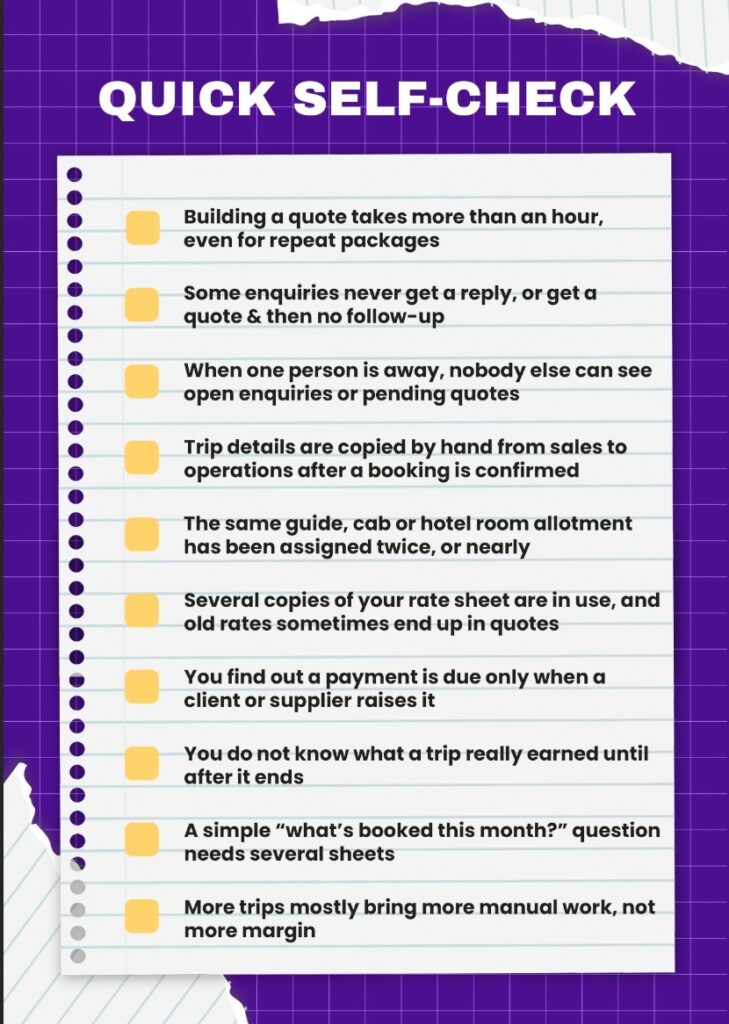
QUICK SELF-CHECK: HOW MANY DID YOU COUNT?
Now that you have seen all ten signs, here is a quick way to check where you stand. Tick every statement that is true for your business today.
Your score
0 to 2: Spreadsheets are still doing the job. Tighten your process now, and run this check again in six months.
3 to 5: The strain is already showing: slow quotes, missed follow-ups and details lost along the way. It is time to compare tour operator software options.
6 or more: You are past the tipping point. These problems tend to grow with every extra trip, so it is time to look at software built for your business.
What These Signs Costs You
Your score shows how far along you are. Now the next question which should be discussed is what it is costing you.
The costs fall into 4 areas for most tour operators:
- Lost leads: Slow quotes and missed follow-ups send enquiries to faster competitors.
- Lost repeat clients: Handover errors and double bookings spoil the experience that brings people back.
- Margin leakage: Outdated rates and unseen costs quietly cut what each trip earns.
- Team strain: Rebuilding trips and staying reachable on leave wears your people down.
Want to see what lost leads may be costing you? Here is a quick estimate:
Missed follow-ups per month × your conversion rate × your average margin per trip = the most you may be leaving on the table each month.
For example, say 15 enquiries a month get no follow-up and you convert one in five. If a trip earns you ₹30,000 in margin, that is 15 × 0.2 × ₹30,000 = ₹90,000 a month.
Use your own figures. Leads that never got a follow-up usually convert below your normal rate, so treat the result as an upper estimate, not a forecast.
Your own number will depend on which signs hit you hardest, and that varies with the kind of tour operator business you run.
Does This Look Different For Inbound, Outbound & Mixed Operators?
The 10 signs apply to every tour operator. Which ones you feel most depend on whether you run inbound, outbound or both.
| Inbound Tour Operator | Outbound tour operator | Mixed Operators | |
| Common problems | Seasonal rates worked out by hand. Customised quotes and revisions for foreign agents. Guide and cab clashes in peak season. | Waiting on partner quotes and retyping them. Costing errors and margin lost to exchange rate changes. Consumer leads going cold. | Both sets of problems, plus two businesses to run and report on. |
| Signs to watch most | Sign 1: Quotations take hours Sign 4: Details get missed at handover Sign 5: Double bookings Sign 6: Version control breaks down Sign 7: Payments go uncollected Sign 8: Unclear trip margin | Sign 1: Quotations take hours Sign 2: Enquiries fall through follow-up Sign 3: The business runs out of one inbox Sign 6: Version control breaks down Sign 7: Payments go uncollected Sign 8: Unclear trip margin | All signs from the inbound and outbound columns, plus Sign 9: Manual reporting Sign 10: Growth adds workload, not margin, which tends to feel heaviest. |
Your type decides which signs you feel most, but for every tour operator the pattern is the same: small slips that keep repeating.
What Tour Operator Software Fixes, Sign By Sign
Every sign above comes from the same root cause: your quotes, leads, suppliers and payments live in different places.
Sembark is a complete tour operator software that brings them all into one system.
It covers the journey from the first enquiry to the final payment: lead follow-ups, quotations with correct costing, supplier rates, vouchers, the tour calendar and reports.
It is trusted by 1,200+ tour businesses across 28+ countries, whether they run inbound, outbound or both.
Here is how its features fix each sign.
| Sign | Sembark Feature | How It Fixes The Problem |
| Sign 1: Quotations take hours, not minutes | AI Itinerary Builder | Generates a priced itinerary from your contracts and past itineraries after four trip inputs, ready to review and send in about two minutes. |
| AI Itinerary Importer | Turn a supplier package (PDF, Word, image or text) into your own branded editable quotation in under a minute. | |
| Smart Itinerary Builder | Builds a branded, ready-to-share quotation in about 60 seconds, with your rates, markup and tax applied automatically. | |
| Sign 2: Enquiries fall through the follow-up cycle | Auto-Lead Capture | Brings enquiries from Meta Ads, Google Ads, chatbots, landing pages and website forms into one dashboard, with each lead tracked by stage. |
| Auto-Lead Distribution | Assign each new lead to the right salesperson instantly, by your rules or round-robin, so every enquiry has an owner. | |
| Advanced Follow-ups & Reminders | Lets you set a follow-up date on every lead and reminds you by email, in the system and on mobile, with pending and overdue follow-ups on one dashboard. | |
| Sign 3: The business runs out of one inbox | AI Email Reader | Turns real enquiry emails into assigned leads within a minute and keeps the full email thread with the trip. |
| WhatsApp Automation (Notify) | Run your WhatsApp Business number from a shared inbox, with every message logged against its lead or trip, plus automated quotation, voucher and payment messages. | |
| Sign 4: Details get missed at handover | Tourist Profile Management | Saves a repeat traveller’s preferences, such as meal preference and preferred stay, in one profile and shows them while you prepare the quotation. |
| Real-time updates | Any change to an itinerary or transport detail shows instantly on the calendar, so sales and operations always work from the same information. | |
| Sign 5: Double bookings become a real risk | Smart Tour Calendar | Syncs with confirmed trips into one calendar of upcoming tours, and shows each cab, guide or team member against their trip, so a clash is visible the moment it happens. |
| Sign 6: Version control breaks down | Bulk Upload, Edit & Delete | Adds, updates or removes suppliers, rates and services in bulk in a few clicks, and one centralised rate sheet feeds pricing for both quotations and vouchers. |
| Smart Price Handling | Stores supplier contracts with validity dates and sets rates by season, weekday or break period, so rates stay accurate in every travel season. | |
| Automatic Mastersheet Creation | Builds your Mastersheet automatically from imported supplier packages, saving each detected hotel, transport option and activity for reuse in later quotations. | |
| Sign 7: Payments go uncollected past the due date | Real-Time Payment Tracking | Shows received and pending payments for each trip, plus supplier payables by service, with reminders by phone, email and inside the software. |
| Suppliers Ledger | Keeps a live ledger for each supplier, with costs recorded from confirmed bookings, plus payments, advances and balances. | |
| Payments By Sembark | Adds payment links to quotations, vouchers and invoices, applies your instalment rules and reminds clients automatically. | |
| Proforma Invoice | Creates a proforma invoice from the final quotation in one click and keeps every revision on record. | |
| Sign 8: Trip margin stays unclear until reconciliation | Pricing & Mark-up | Sets markup and tax by component and reprices instantly when a cost changes, so the quote shows cost, markup, tax and profit before you share it. |
| Sign 9: Reporting means manual consolidation | Real-Time Reports | Live reports on leads, sales, follow-ups, conversions and revenue by person, team, destination or period, in one click and without manual consolidation. |
| Trip-Check-in / Check-out Reports | Shows guest check-ins and check-outs by service, date range or supplier in one click, with live trip progress. | |
| Sign 10: Growth adds workload, not margin | Multi-Brand Expand | Runs B2B, B2C and destination-based brands from one login, with separate enquiries, bookings and finances for each, instead of two systems. |
| User Management & Roles | Gives each team member a defined role and permissions, so responsibilities stay clear, and tracks user actions and access. |
Ready to Move Beyond Spreadsheets? Next Steps
Knowing which signs you have is only half the job. These three steps help you pick what fixes them.
- Rank the signs you ticked. Put the ones that cost you the most in lost bookings, late payments or margin at the top. These decide what the software must fix first.
- Shortlist by that ranking. Look only at tour operator software that covers your top-ranked signs from start to finish, from the first enquiry to the final payment.
- Test with your hardest trip. Take the trip that caused the most slips, such as a multi-supplier itinerary, a late change or a split payment. Ask each vendor to handle it live with your own rates, from quote to payments.
Related reading: https://sembark.com/blog/how-to-choose-tour-operator-software/
Check out Sembark’s Tour Operator Software Rating on Best Review Platforms: Sembark G2 Rating, Sembark Google Rating, Sembark Trustpilot Rating

FAQs
Is a generic CRM enough for a tour operator?
No. A generic CRM stops at contacts, deals and email tracking. It has no itinerary builder, tour costing or supplier ledger, so quoting, costing and supplier payments stay in spreadsheets. Tour operator software adds these workflows, from quote to booking to supplier payment.
Will tour operator software just add extra cost?
Yes, it adds a cost: Sembark charges a one-time setup fee plus a monthly fee per user, with no long-term contract. But spreadsheets already cost you through lost leads, outdated rates and hours spent rebuilding quotes. Sembark targets exactly these, with quotes built in about 60 seconds, a follow-up date on every lead, and profit shown on each quote before you share it.
Is it difficult to switch from spreadsheets to tour operator software?
No. Sembark moves your data, trains your team and sets everything up, and most tour operators go live in under a week. Data migration, onboarding and training are included, so your daily work doesn’t stop while you switch.
Where is my tour data stored, and can I export it?
Your data is stored securely on AWS RDS with strong encryption and secure access controls. You can export it to CSV any time, and even after you cancel, Sembark gives you a 30-day window to take your data with you. Your data is always yours.
Can my whole team use it, even when they’re on the road?
Yes. Sembark gives your sales, operations, accounts and management teams role-based access, so each person sees exactly what they need. It works on any device, including mobile, and support is available 24×7 via WhatsApp, email or calls.
Ready to see how Sembark works with your own trips? Request a free 30-minute demo and bring your hardest trip.
Related Blog