








This release introduces major enhancements across Transport, Quotation, Security,Hotel and Task Management modules. Some of the major updates include transport service editing, multiple transport service addition, new cab cost metrics, cab capacity management, and improved multi-cab handling in a single service. System rate-change detection improves quotation accuracy, while destination-level child age ranges improve consistency across hotels . Task-assignment email notifications improve team communication, and admin-controlled 2FA strengthens account security. Several UI refinements, bug fixes, and workflow improvements have also been implemented for a smoother overall experience.
Let’s go into more details.
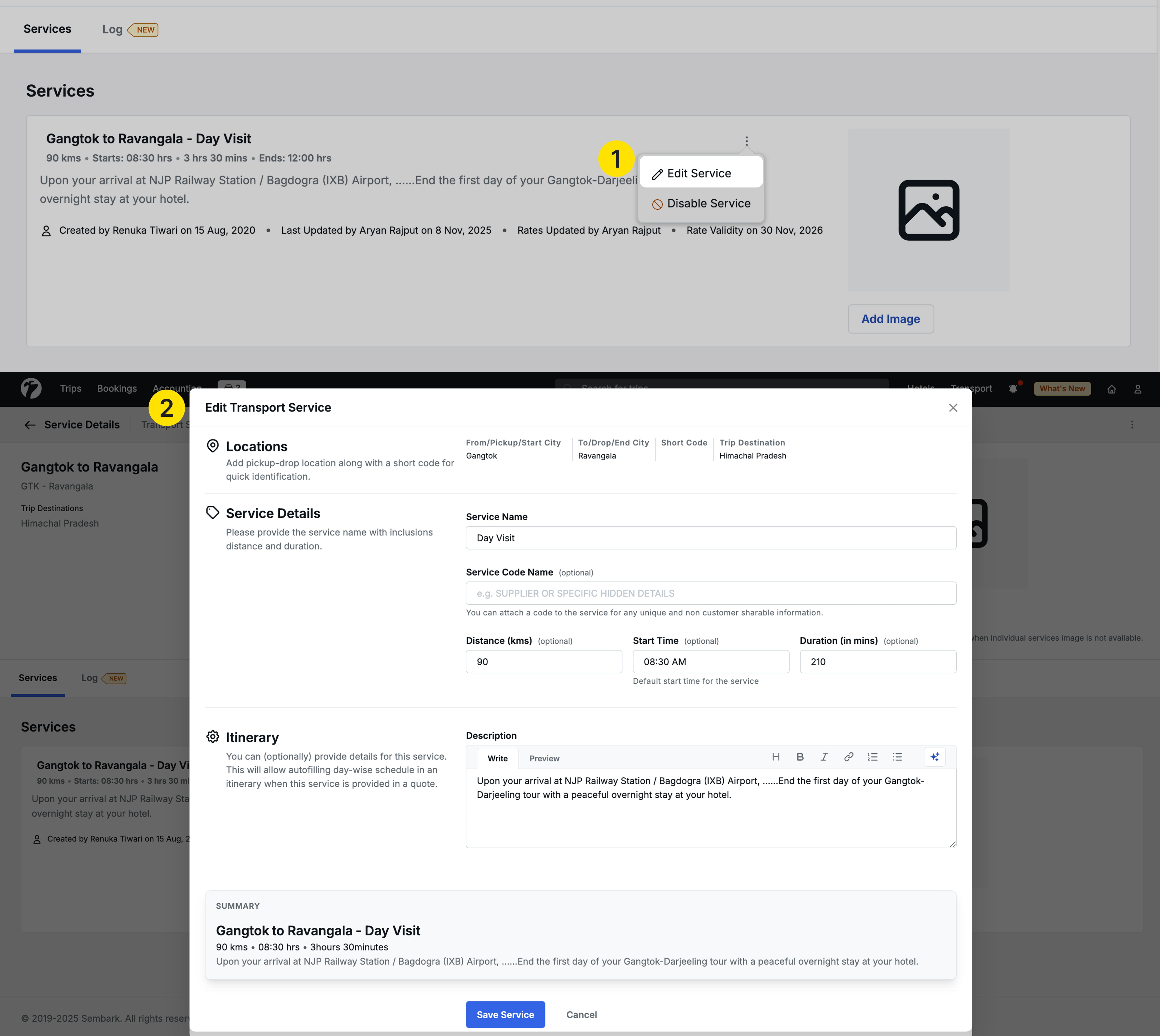
1. Transport Services Edit
We have added the ability to edit transport services directly in the system. Previously, you could not edit any transport service after creation. If you mistakenly uploaded wrong information through a sheet/manual process or needed to make changes to existing services, the process was complicated and time-consuming you had to upload a new sheet entirely just to make changes. With this enhancement, you can now modify existing transport services directly in the system without needing to upload a new sheet.
Impact on Quotations
- Service Name edits mark the service as Disabled in existing quotations, but workflows continue without interruption.
- All other edits (distance, duration, etc.) auto-update in existing quotations and are reflected in all new quotes as well.
2. Transport Service Multiple Add
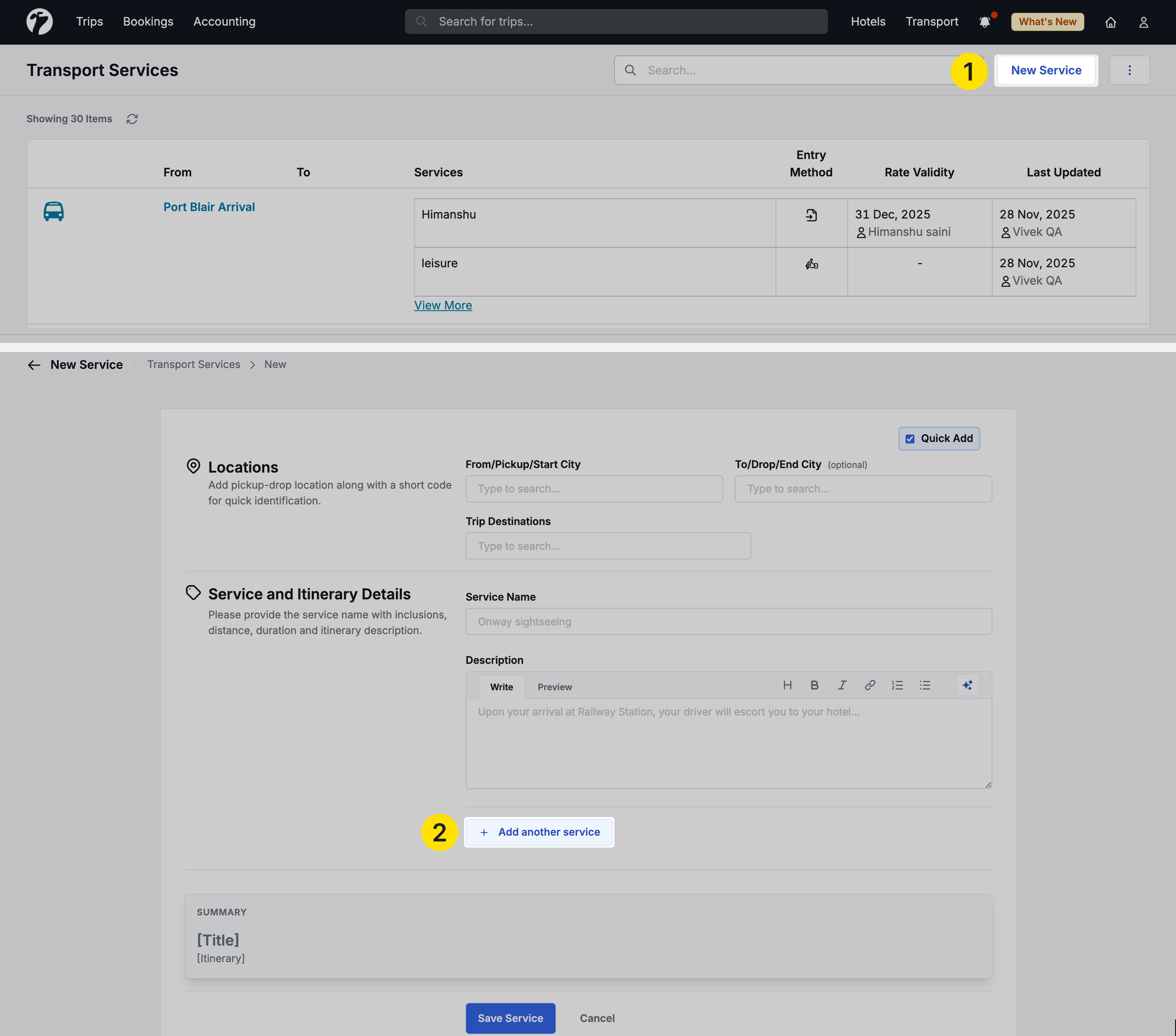
Now, you can add multiple transport services in one go, it eliminates repetitive form filling when adding multiple services to the same route, improving operational efficiency and reducing time spent managing transport services.
3. Metrics
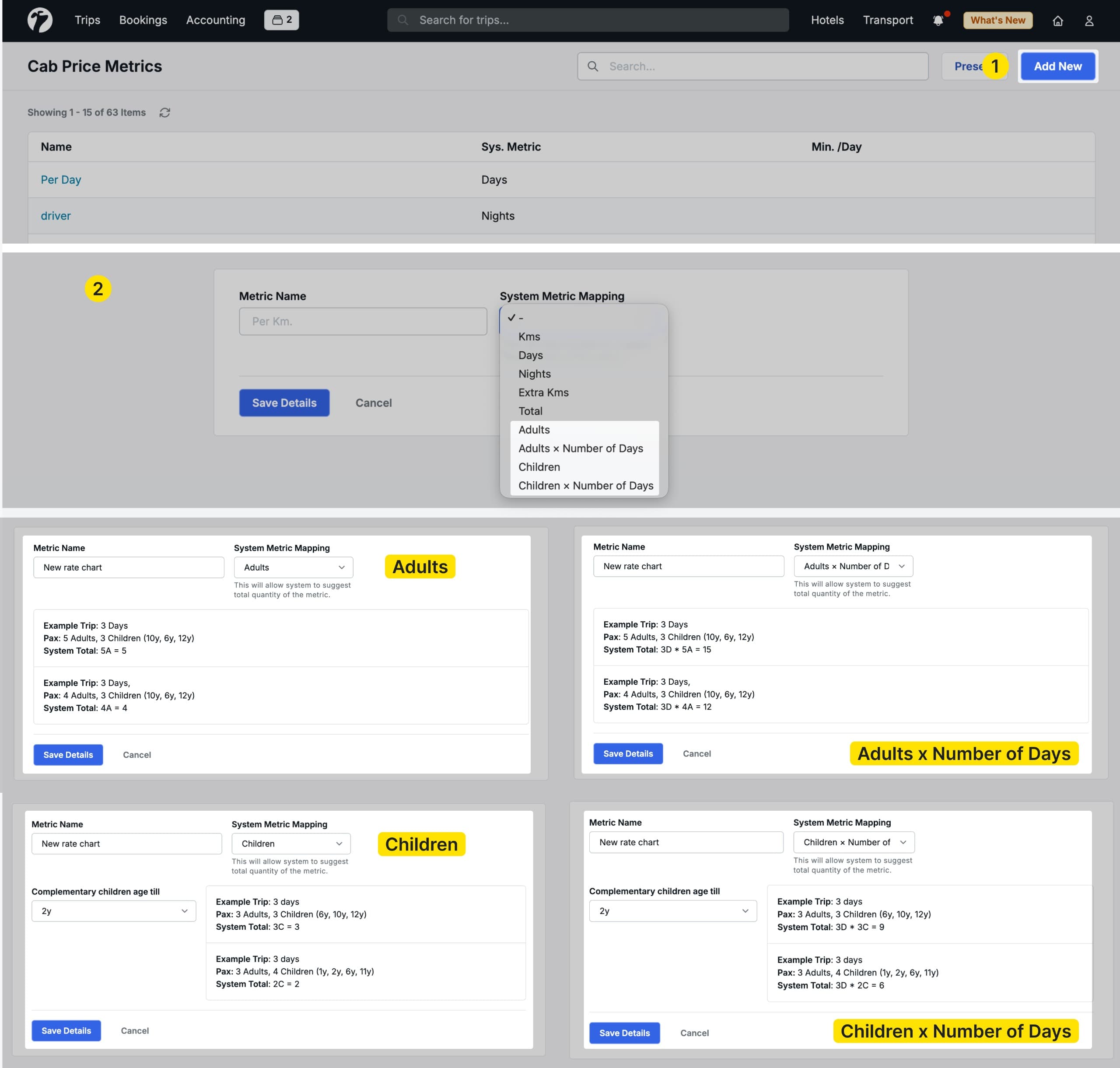
In cab cost calculator we have added new metrics -
-
Per adult - Calculates One time cost for a particular adult
-
Per children - Calculates One time cost for a particular children
Children below or equal the selected age are complimentary; above are counted in metrics
-
Per Adult x Day - Calculates metrics over the Adult multiplied by number of days.
-
Per Children x Day - Calculates metrics over the Children multiplied by number of days.
Now, you can calculate the cost according to these metrics. These metrics will be very useful, If you charge on the basis of per adult, per child’s cost for a particular service.
Let’s understand this with a simple example-
A company from Sri Lanka wants to calculate the cost for the water bottle which they are providing during the service, so he/she can calculate per adult cost for x no. of days also.
Water bottle cost - 20 LKR
No. of days - 5, No. of adult - 2
Per adult cost- 2 * 20 = 40 LKR
Per adult*days- 10 *20 = 100 LKR
4. Cab Capacity
To improve accuracy during transport quotation creation and streamline overall workflow efficiency, we’ve introduced new options to define cab capacity within the Transport Module. These updates help prevent incorrect cab allocations and provide clearer visibility during quotation preparation.
4.1. Cab Capacity via Upload Sheet
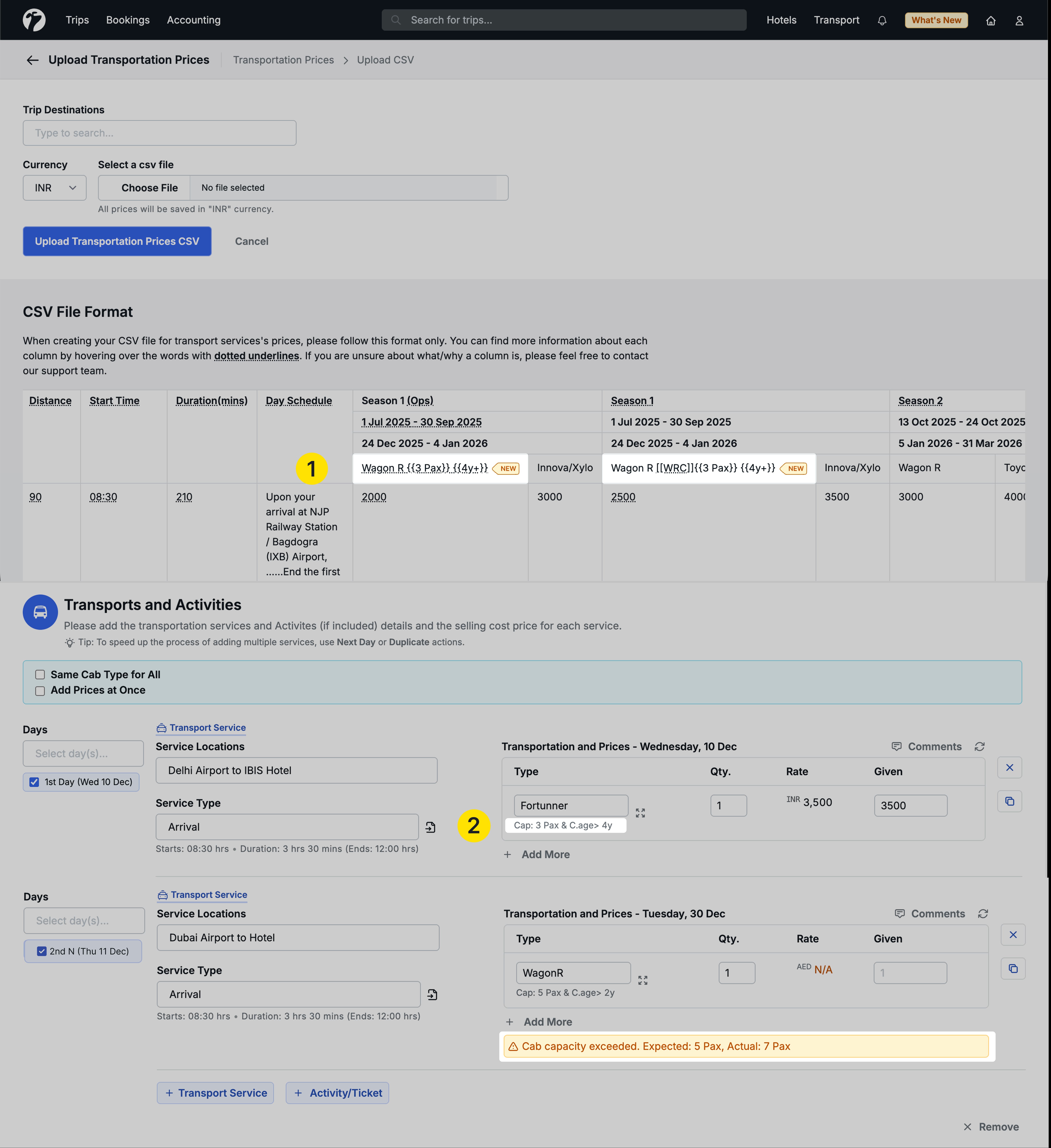
You can now define cab capacity directly from the upload sheet using the Cab Capacity field.
-
The cab name format now supports: Cab Name {{Capacity}} {{Child Age}}.
- Example:
Xylo {{3 Pax}} {{4y+}}
- Example:
-
This capacity information is displayed in the quotation pop-up for quick reference.
-
If a user selects a cab with insufficient seating, the system shows a warning message, while still allowing the user to proceed if needed.
-
You can still use the short code using
[[SHORT_CODE]]syntax.
4.2. Manual Cab Capacity Entry
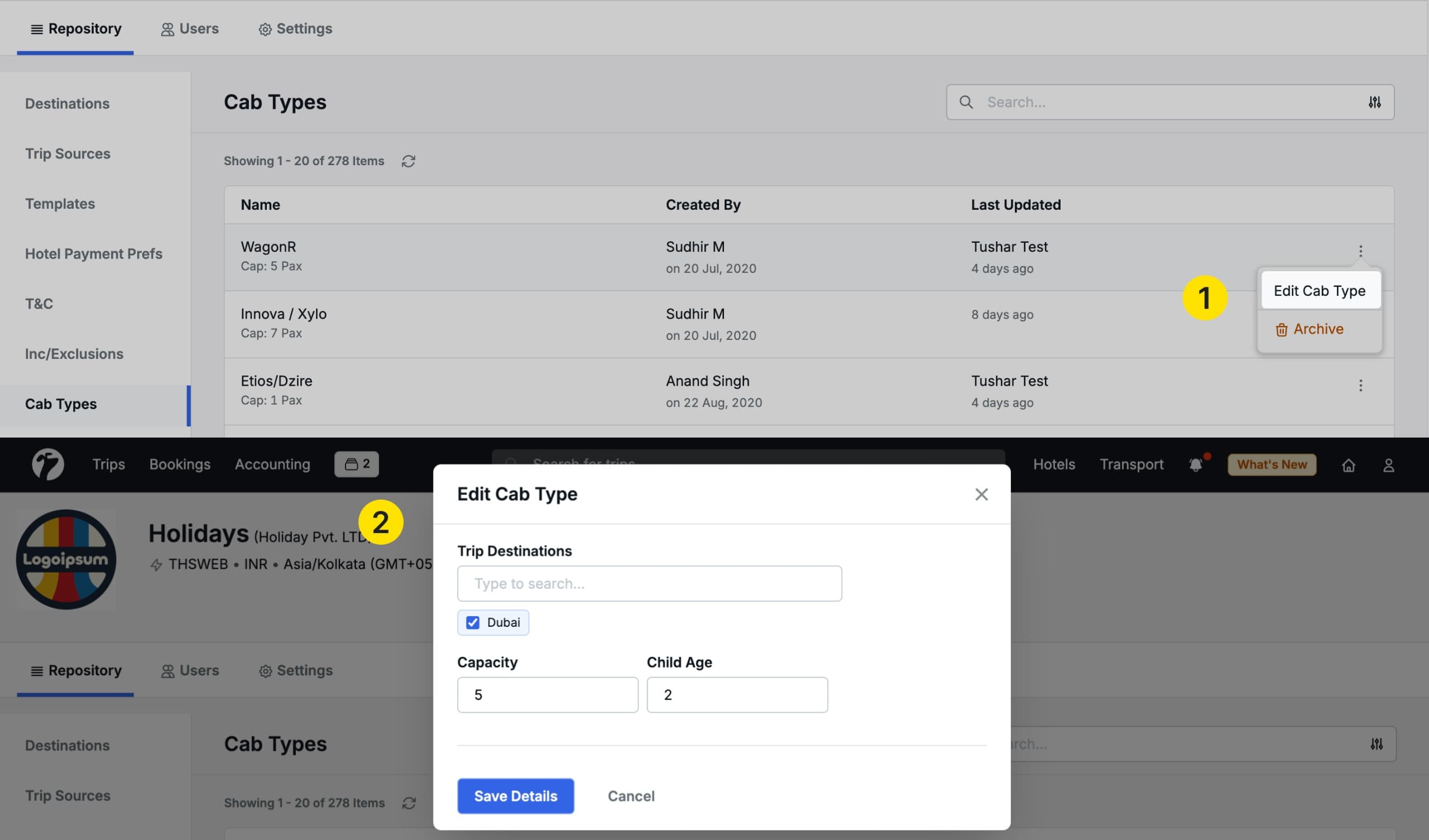
Cab capacity can also be added or updated manually within the module.
- Users can enter capacity and child age details directly.
- This information is visible in the quotation pop-up for convenient reference during cab selection.
5. Multi-cab Management in Single Service
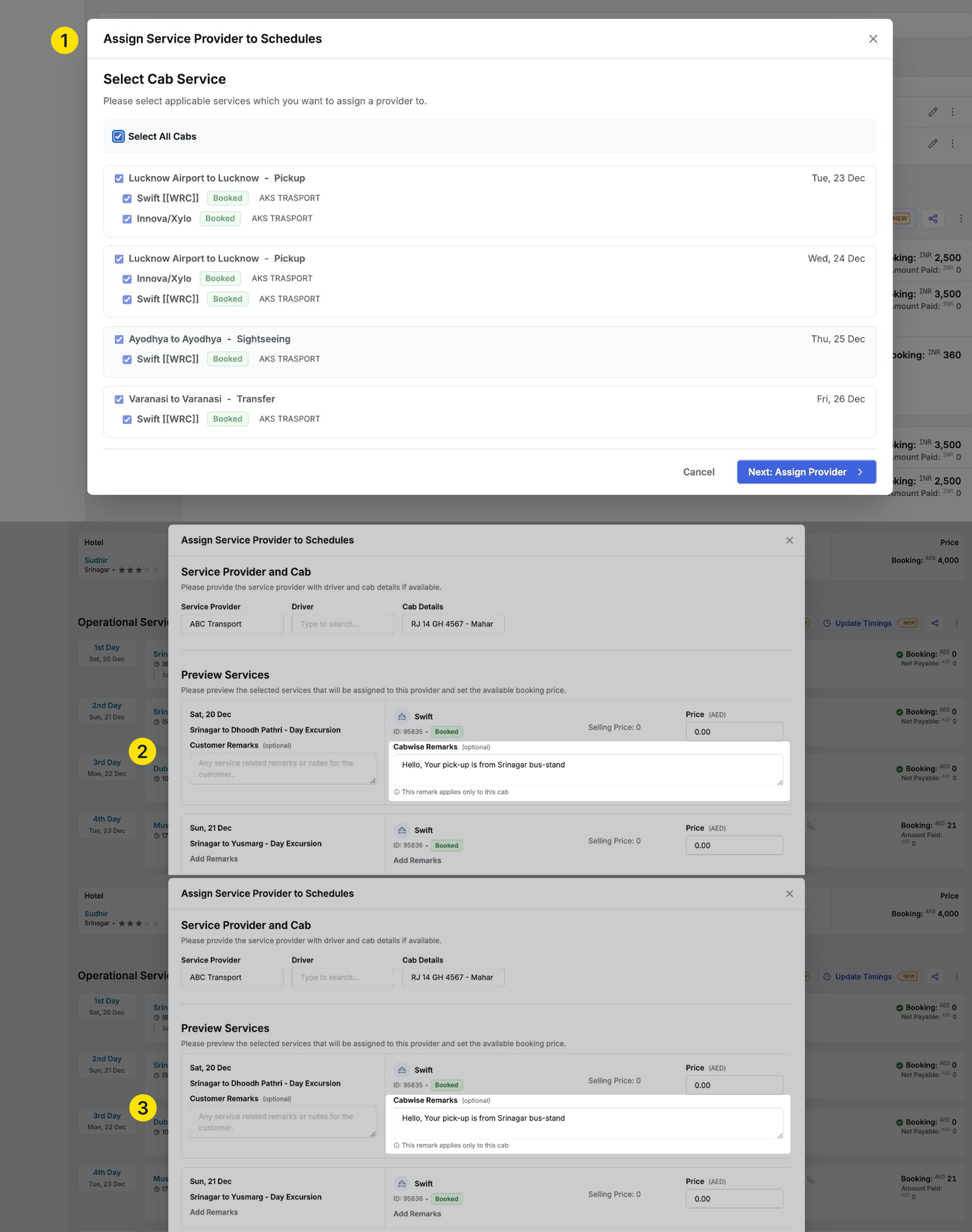
The Multiple Cab Operations update introduces enhanced cab-level configuration within a single service booking. When the “Customise these Details Cabwise/Cabwise Timing” option is enabled, users can assign individual pickup time and duration for each cab. In addition, the update allows adding cab-specific remarks and internal comments also.

These configurations can be applied while editing service bookings, updating cab suppliers, or modifying transport service timings. Overall, this enhancement offers greater precision and clarity when handling multi-cab services with different routes, timings, or instructions.
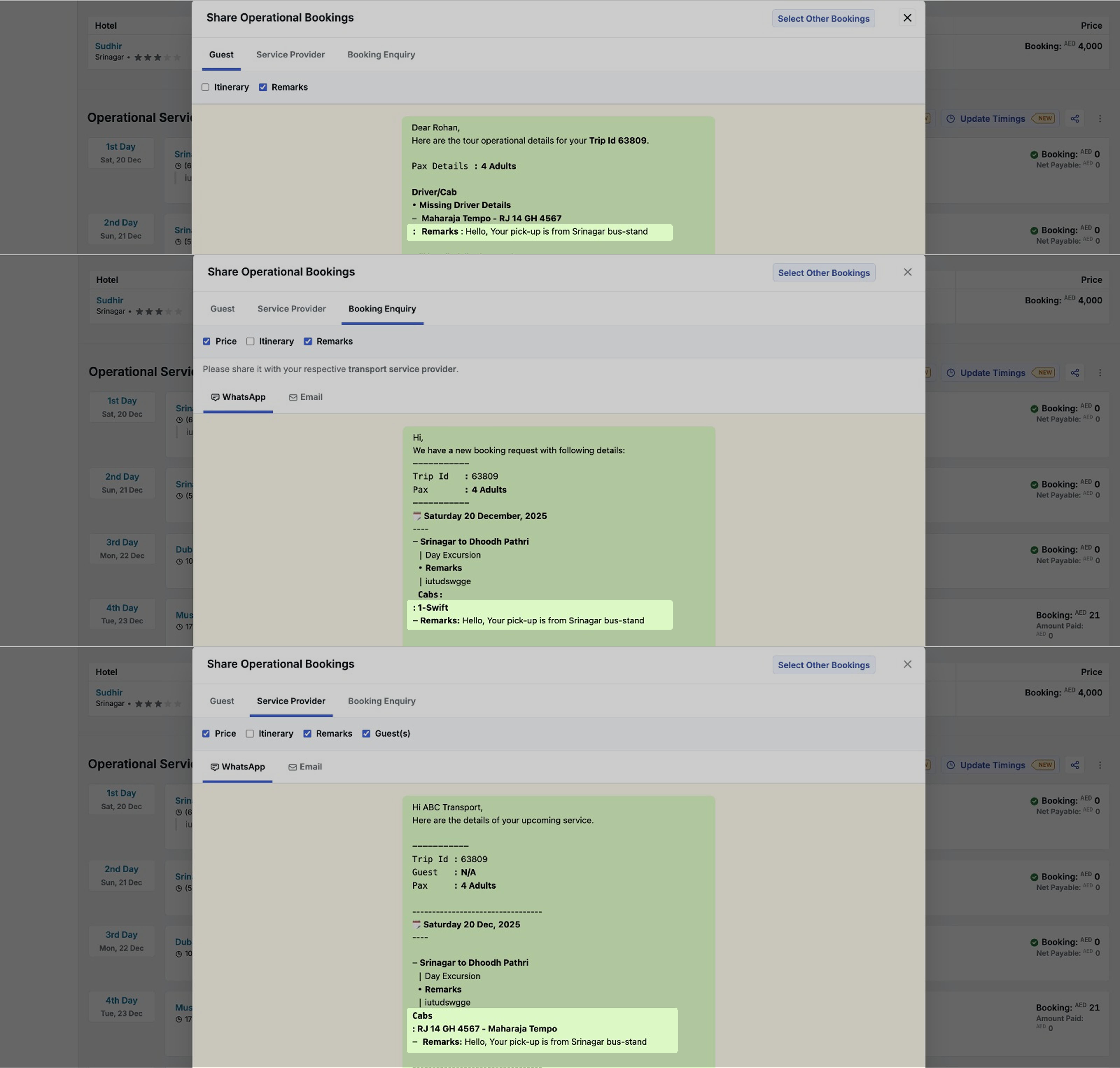
All cab-level details—timings, remarks, and comments—are clearly reflected across operational views, schedules, and all sharing formats, including WhatsApp, email, and booking summaries, while service-level information remains visible for overall context.
6. General Hotel Notes
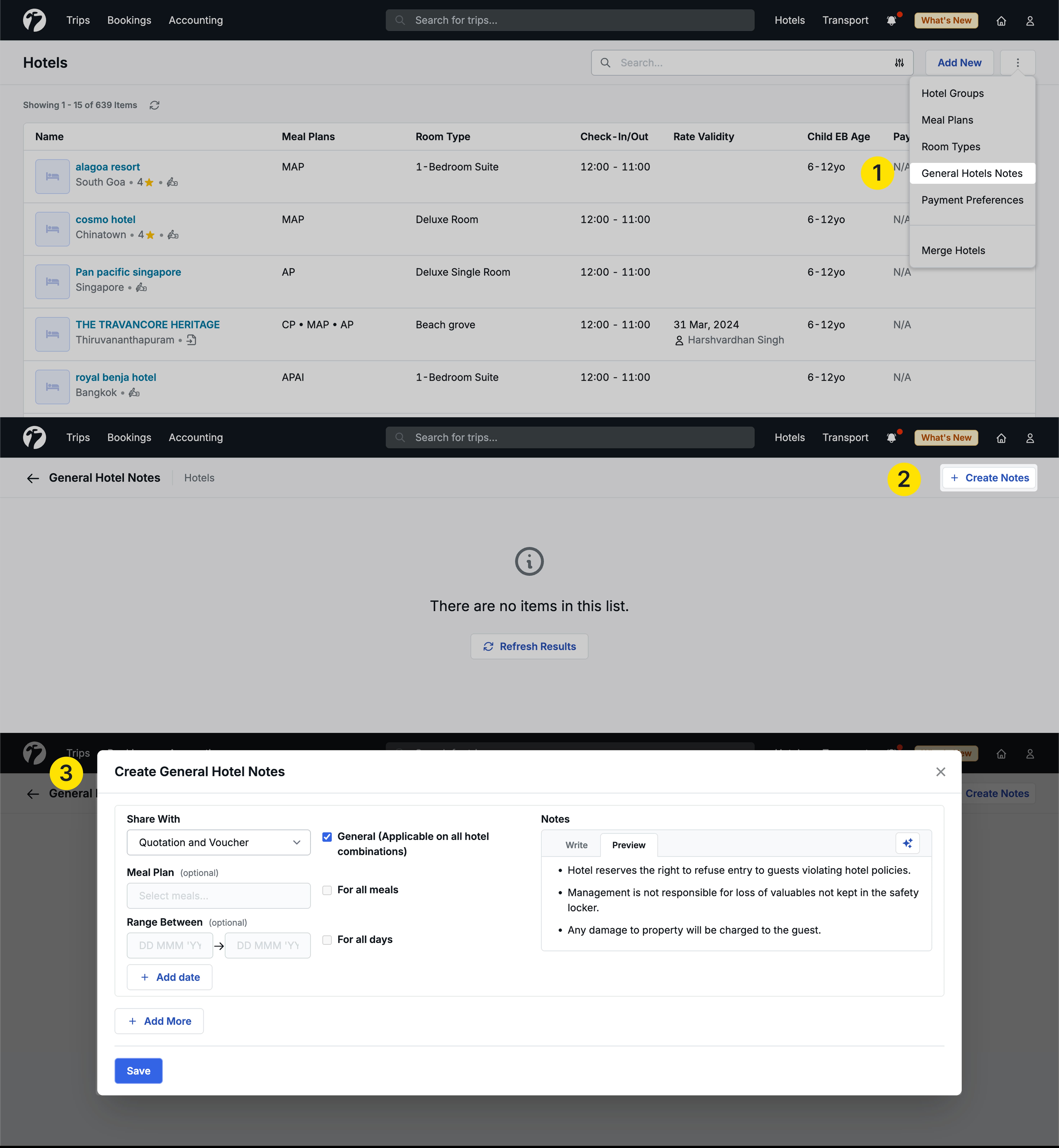
Now, You can create General Hotel Notes that apply across all hotels instead of being linked to a single Hotel. These notes can be configured for all hotels by default or refined further using options like meal plan type or specific date ranges. These notes appear in a dedicated section during quotation creation and hotel booking, and are grouped as “Applicable to all” across summaries, service bookings, PDFs, WhatsApp, and emails. This feature allows teams to record common guidelines, instructions, or policies that should be visible for every hotel used in a quotation. You can set notes such as “Applicable for all hotels,” “Applicable for all hotels with a specific meal plan,” or “Applicable for all hotels for defined days.”
These notes help ensure consistency, reduce repetitive data entry, and maintain standard information across quotes. They can be used internally or displayed in the PDF, and will also be shared through WhatsApp, email, vouchers, and PDFs as per the sharing options selected at the time of creating the note.
Slight modification in existing Hotel Notes feature
Now we can add notes voucher only also.
7. Rate change detection for quotes to handle system rate change
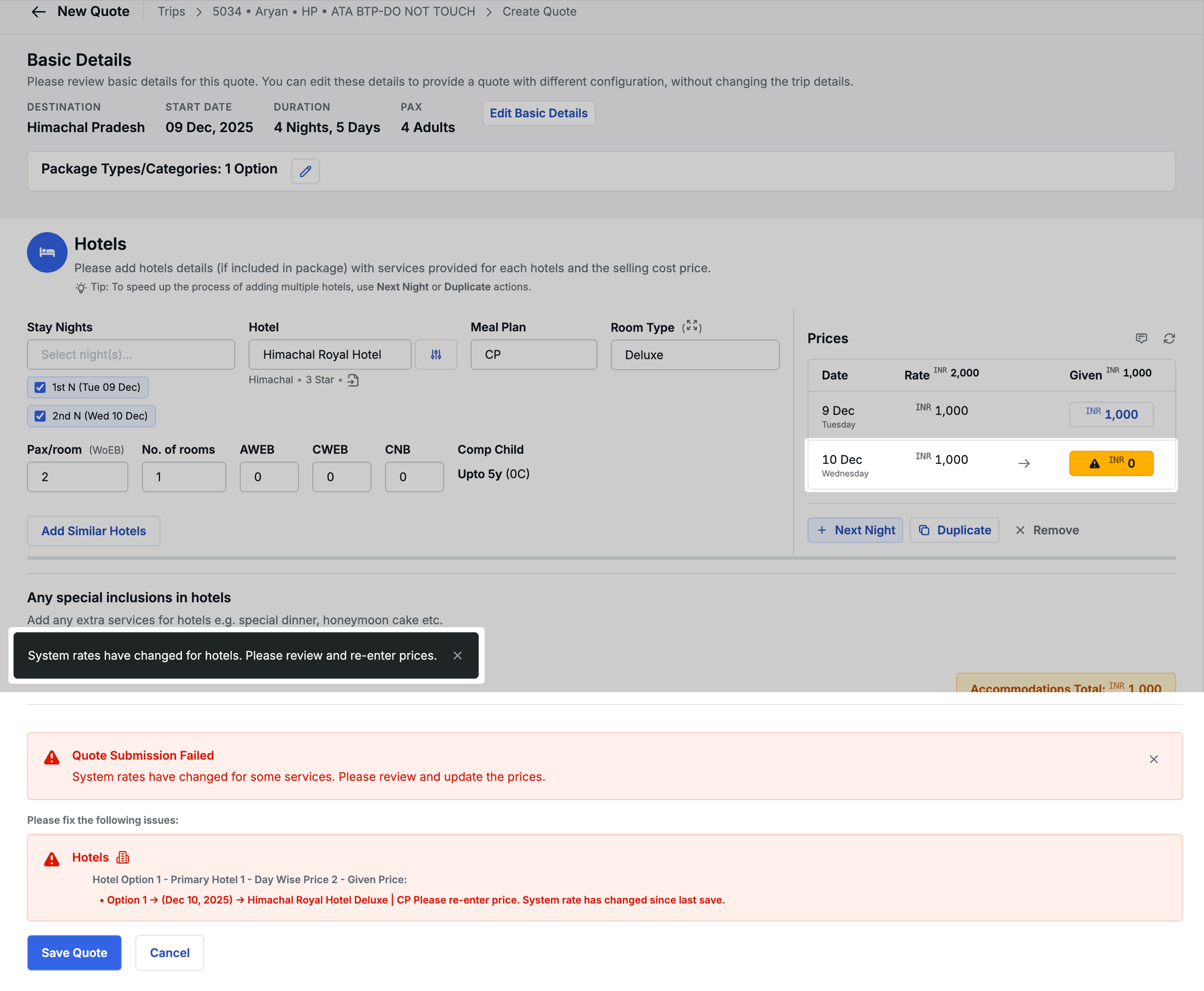
Earlier to this update, if we had modified the system selling rates with custom prices during quotation, and if we tried to edit the quote when someone had changed the system selling rates (uploaded new contracts), then the modified prices would remain unchanged. The system would still show the correct latest rates but the selling prices would not get modified.
Let’s understand it with an example.
- On day 1, we created a quote where the XYZ hotel had a system selling rates of INR 5,000. But we modified the prices to say 4,000 after looking at some offers online.
- On day 2, someone uploaded the new rate sheets and modified the system rates to INR 3,500.
- On day 3, we came back to make some amendments in the transportation section in the quote. The system will fetch the latest rates of 3,500 for the XYZ hotel but will neither notify nor update the manual rates.
Sometimes, it might be okay but most of the time, we would like to know of this change. This update is specifically designed for that purpose in mind.
With this update, if the system rates change between quote amendments, you will get system notifications informing you regarding the same. You MUST set the new prices to save the new quotation. You can keep the older prices or update the prices as per the new rates as per your decision.
8. Child Age range configuration on destination level
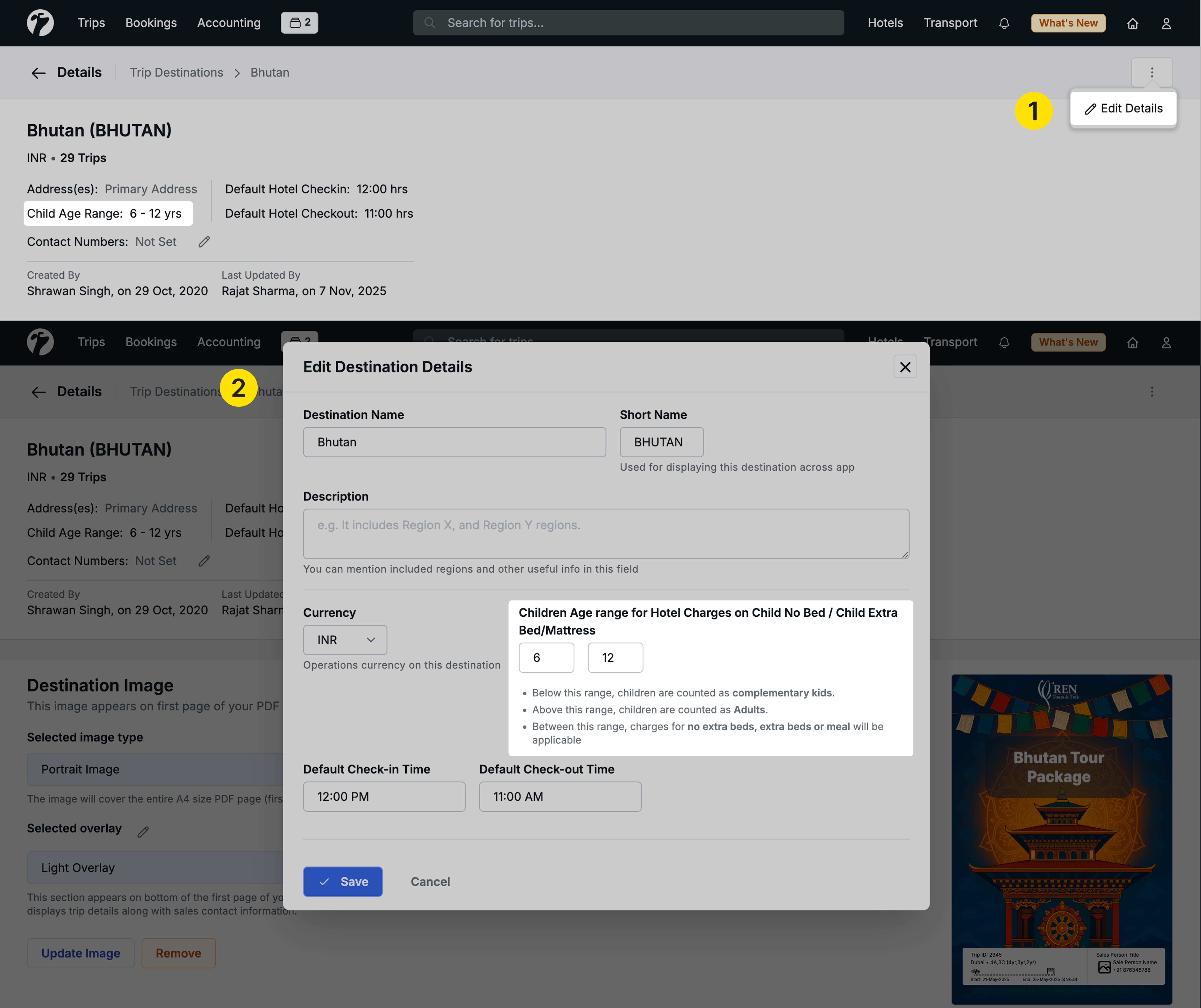
Introduced a new Child Age Range feature that improves the previous “Maximum Age for Child” field. Destinations can now define standard child age ranges, which hotels automatically inherit—reducing repetitive data entry and improving consistency across properties. You can still override these defaults for specific hotels when required. The updated age range structure seamlessly integrates with the Trip Module, where the end age functions as the maximum child age.
9. 2FA By admins to team members
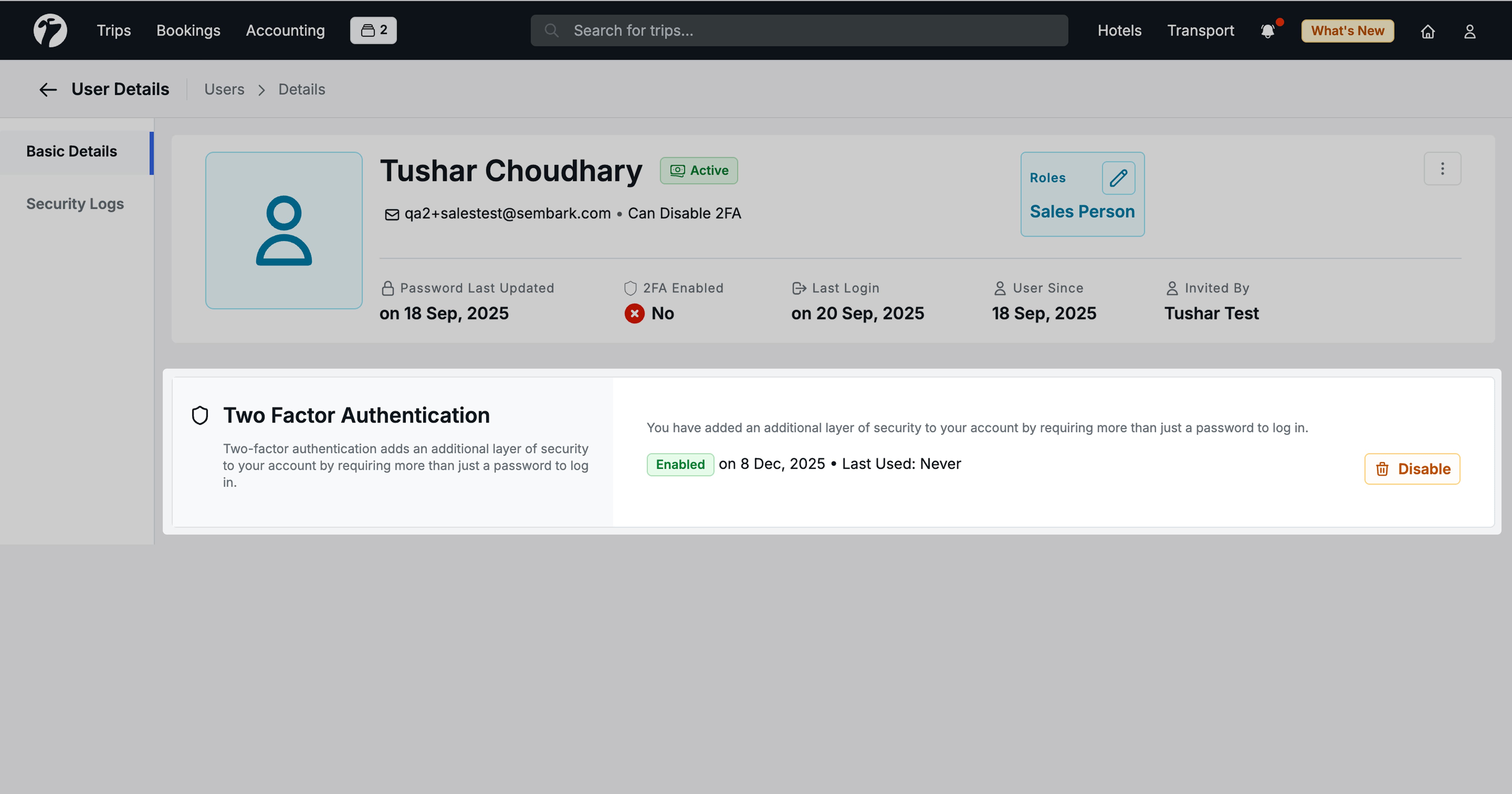
Previously only the individual users had the capability to add two factor authentication for themselves. Now with this update, Admins will have access to the two factor authentication settings for their team members from the User Management dashboard. Also an icon will be displayed next to the user’s name on the Users Management dashboard if two factor authentication is enabled for the user. If the admin enables two factor authentication for a team member then the team member would not be able to disable it and must enter the 2FA code during logins. However, the admin can disable the 2FA if required.
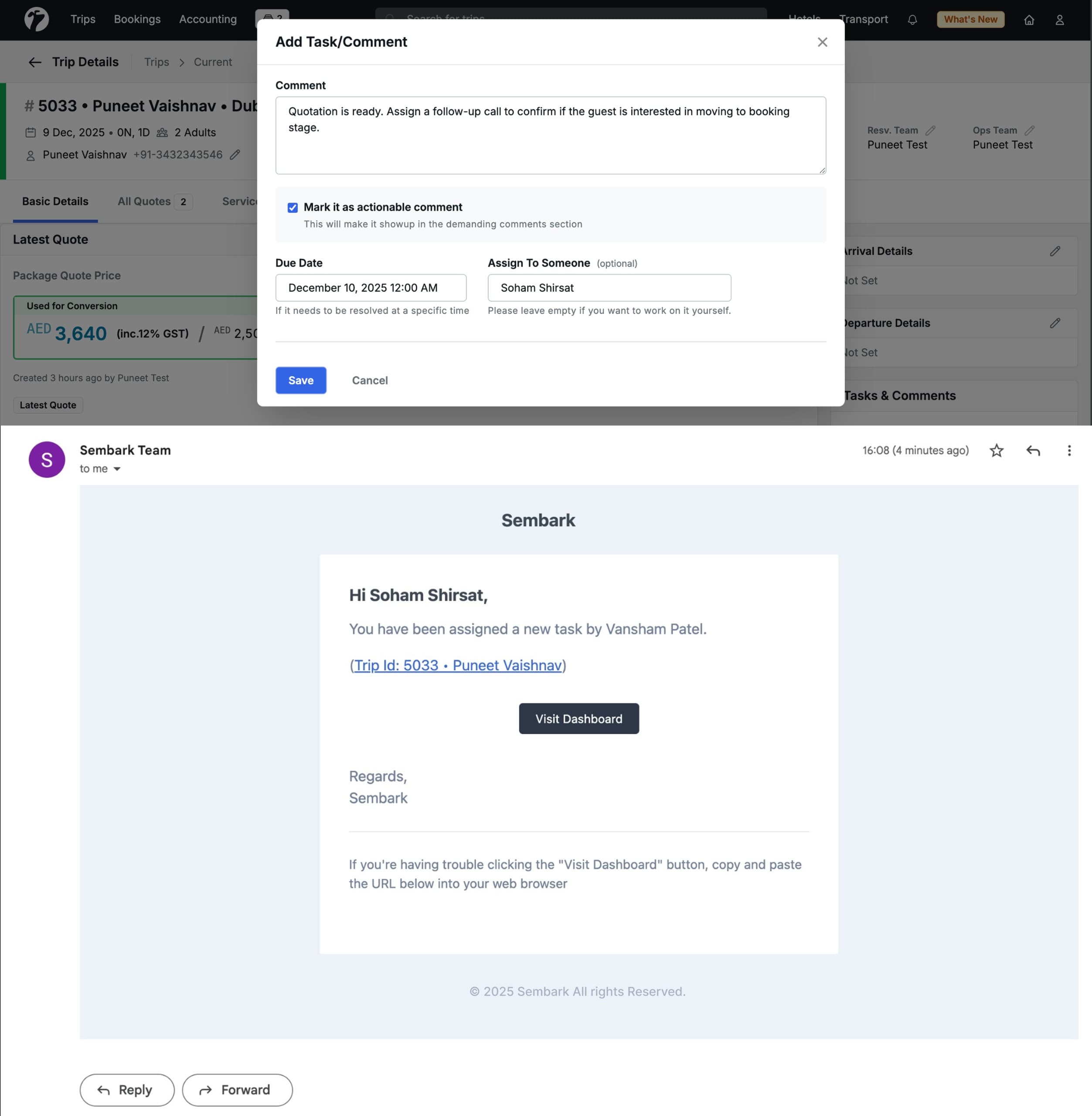
10. Task Assign Email
Added functionality to send automated email notifications when a task is assigned to a user. When User Y assigns a task to User X, the system sends an email informing User X about the newly assigned task. The existing reminder email functionality remains unchanged and will continue to work as before.
11. Other Improvements
- Disable Activity & Transport Services will not shown in Suggested Quotes.
- Bug fix in hotel Quote rate Reset.
- 0 Night / 1 Day fixed in sharing.
- New flow of rates in initial bookings.
- Allow any date selection for Flights in Quotation.
- If booked all cab services and there is pending activity then it will not showing in In- Progress.
- Hotel Voucher file Name bug.
- Missing confirmation warning removed From activity.
- Invite Email on the new email address issue resolved.
- Alignment issue in Quote PDF.
- Ref. ID column added in operation booking day-wise all services report.
- Payment log calendar Disabled for future dates.
- Self Booked hotel permission given to operation team.
- Multi-city icon in PDF (Flights).