








This update brings a new unified Supplier module to manage hotel and other service suppliers in one place, along with improvements to Trip check-in/out reports, Quote PDF pricing sections, and hotel’s booking enquiry communication. Admins can now manage trips and sales assignments in bulk, while reports and downloads have been enhanced for better visibility and ease of use. Several workflow and usability improvements have also been added across booking, quoting, and trip management.
Let’s dive into more details.
Hotel Booking Enquiry Email Template
We have introduced a new Hotel Booking Enquiry Email Template to give you better control over how booking enquiries are shared with hotels and suppliers. Admins can visit the `Templates` setting under the Top Right -> Organization -> Repository -> Templates to modify the template for Hotel Booking Enquiry Emails.
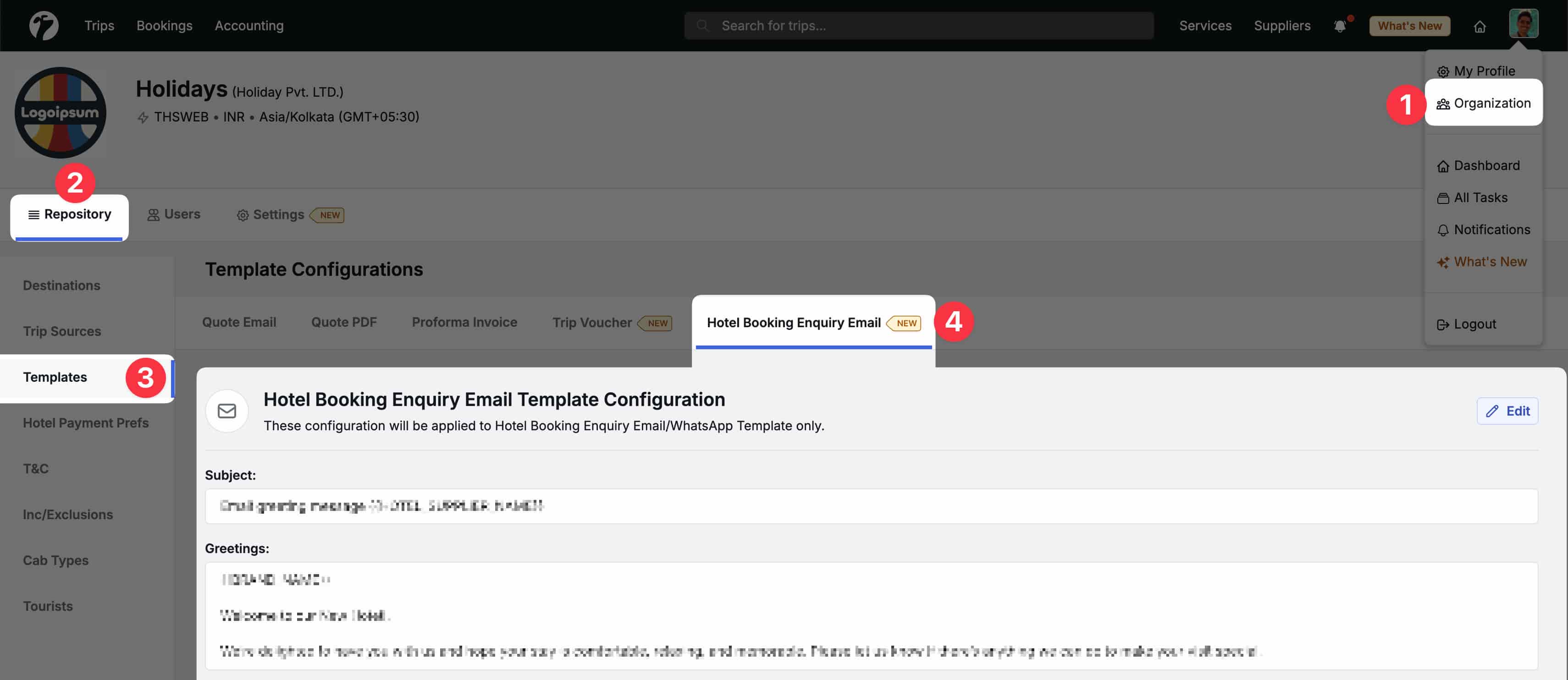
What’s new
- You can now customize the email subject and greeting text based on your communication style or brand tone.
- The same greeting will also be used when sharing booking details via WhatsApp, ensuring consistent messaging across channels.
Smart placeholders
-
The template supports placeholders that are automatically replaced in the email content, provided by the system.
-
Common placeholders include:
{{TRIP_ID}}{{BRAND_NAME}}- and other booking-related details
This makes it easier to send clear, personalized booking enquiries without manually editing emails each time.
Multi-Month Report Download for Trip Check-In / Check-Out
Downloading Trip Check-In and Check-Out reports is now easier when working with longer date ranges.
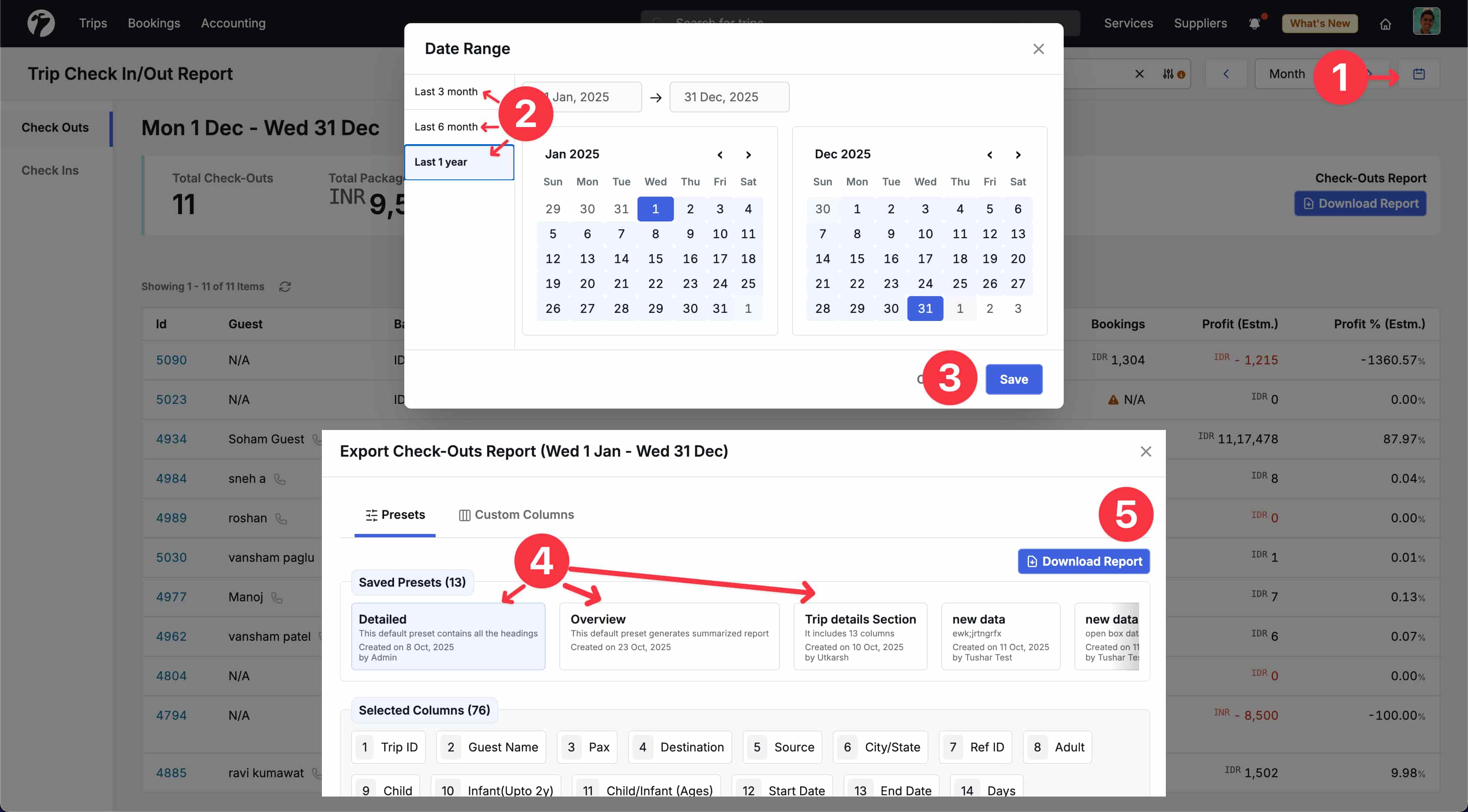
What’s new
- You can now download reports covering multiple months in a single request.
- This is especially useful for monthly reviews, audits, and operational tracking without having to download reports month by month.
Email and notifications
- For large reports, the system will send the report to your email once it is ready.
- A dashboard notification will also appear when the report has been emailed, so you don’t have to wait on the page.
Usage limits
- To keep the system responsive for everyone, these downloads are rate-limited.
- Each report type allows up to 5 downloads within 30 minutes for a logged-in user.
This improvement makes it more convenient to access historical trip data while keeping report downloads smooth and reliable.
Price Section Customization in Quote PDF Template
We have enhanced the Quote PDF Template to give you more flexibility in how price details are presented to customers.
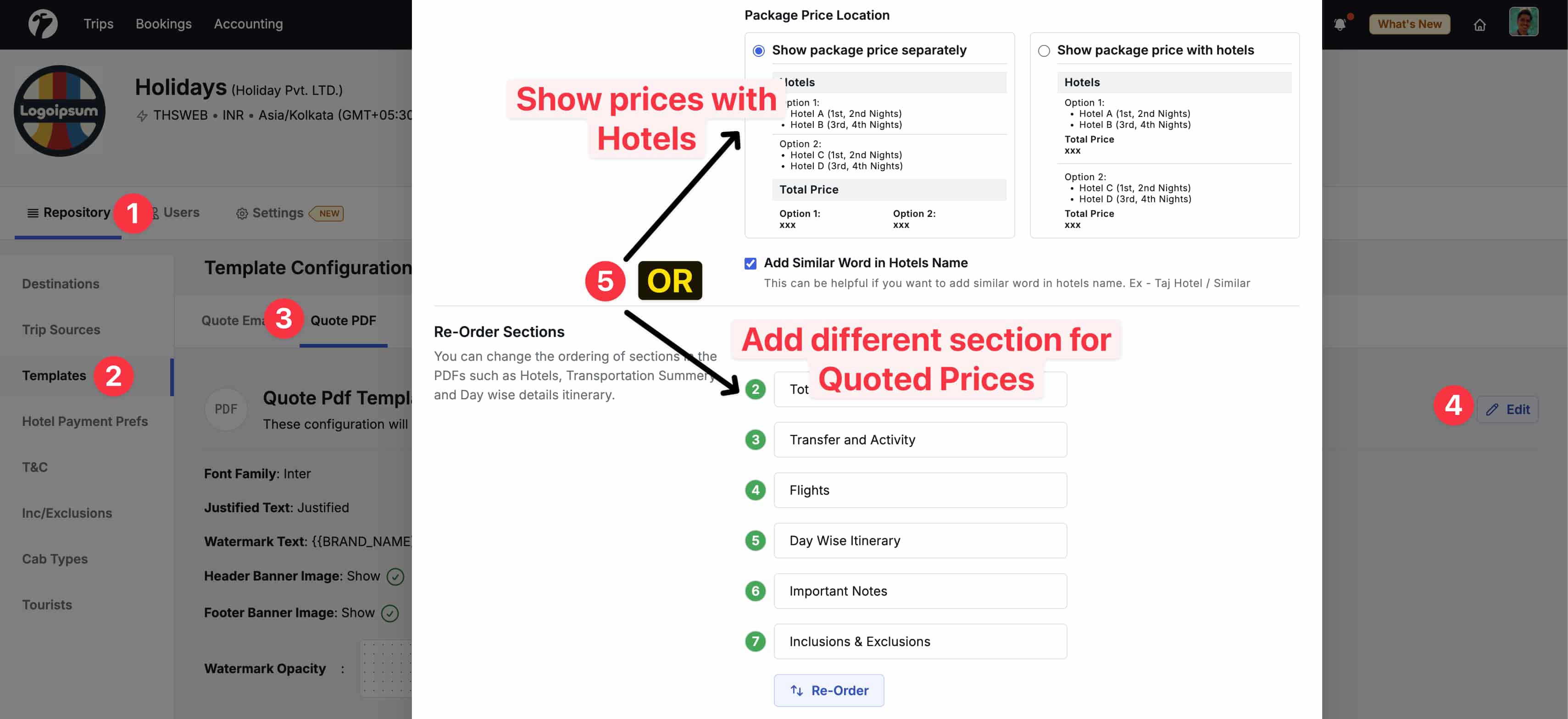
Section reordering
- You can now reorder the “Quoted Price” sections in the Quote PDF based on your preferred layout.
- This allows you to highlight important price information in the order that best suits your sales or presentation needs.
Option-wise pricing with hotels
- The Quote PDF can now display option-wise prices along with hotel details, similar to how prices are shown in Quote Emails.
- This makes it easier for customers to understand price differences between options without too much scrolling in PDFs.
- When using this option, the section ordering of “Quoted Price” will be ignored as prices can not be shown multiple times.
Better alignment with Quote Emails
- These updates bring the Quote PDF and Quote Email templates closer in behavior, especially around sections and ordering.
- This ensures a more consistent experience when sharing quotes across different formats.
Overall, these improvements help present pricing information more clearly and in a way that matches your existing quoting workflows.
Unified Suppliers Module
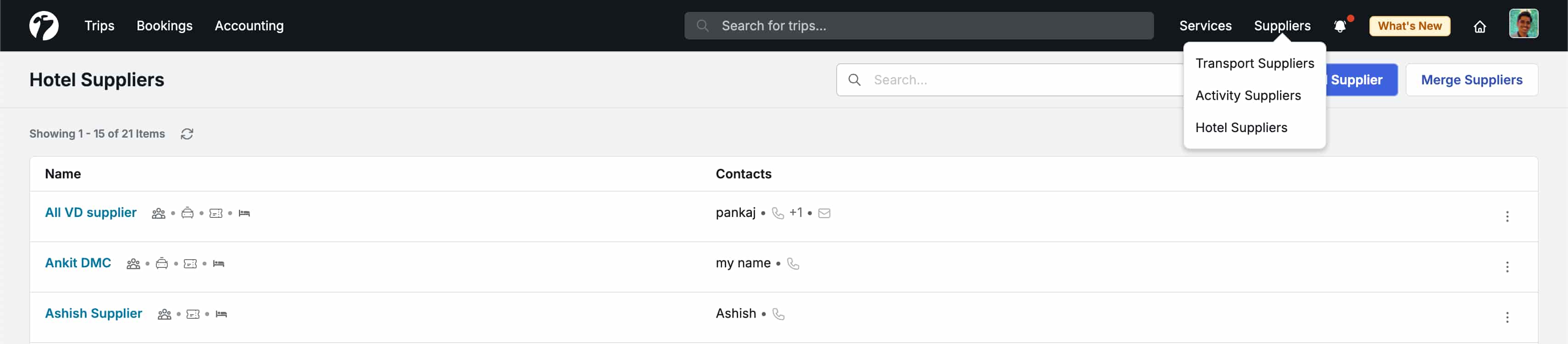
We are introducing a new Suppliers module that brings all your suppliers together in one place, making it easier for Reservations, Operations, and Admin teams to manage supplier-related work.
One place for all suppliers
- You can now manage Hotels, Transfers, and Activities/Tickets under a single Suppliers module.
- Existing Transport and Activity suppliers have already been migrated to this new module.
Improved hotel supplier handling
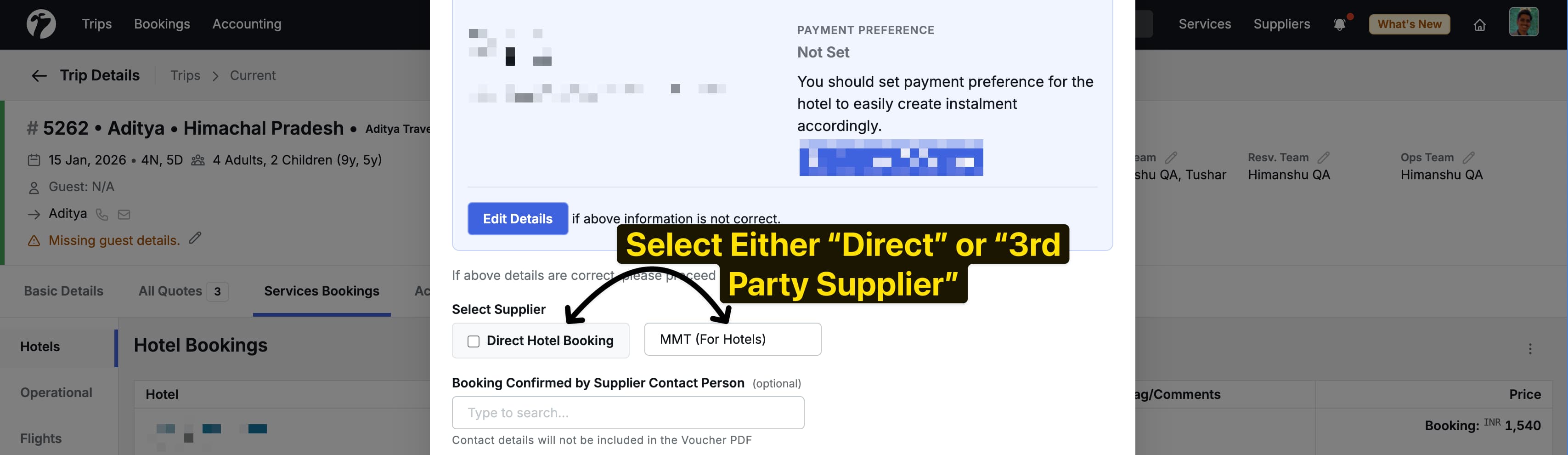
- The module now supports managing hotel 3rd-party suppliers, allowing the Reservations team to assign and manage suppliers directly during the booking process.
- The earlier Booking Method selection for hotel bookings has been updated to use the new Suppliers module.
- The existing Direct Booking flow remains unchanged and can still be used for contracted hotel bookings.
Smooth migration of existing data
- All earlier non-direct booking methods have been moved into the new Suppliers module.
- Existing bookings linked to these suppliers have been migrated automatically, ensuring continuity without data loss.
Flexible supplier setup
-
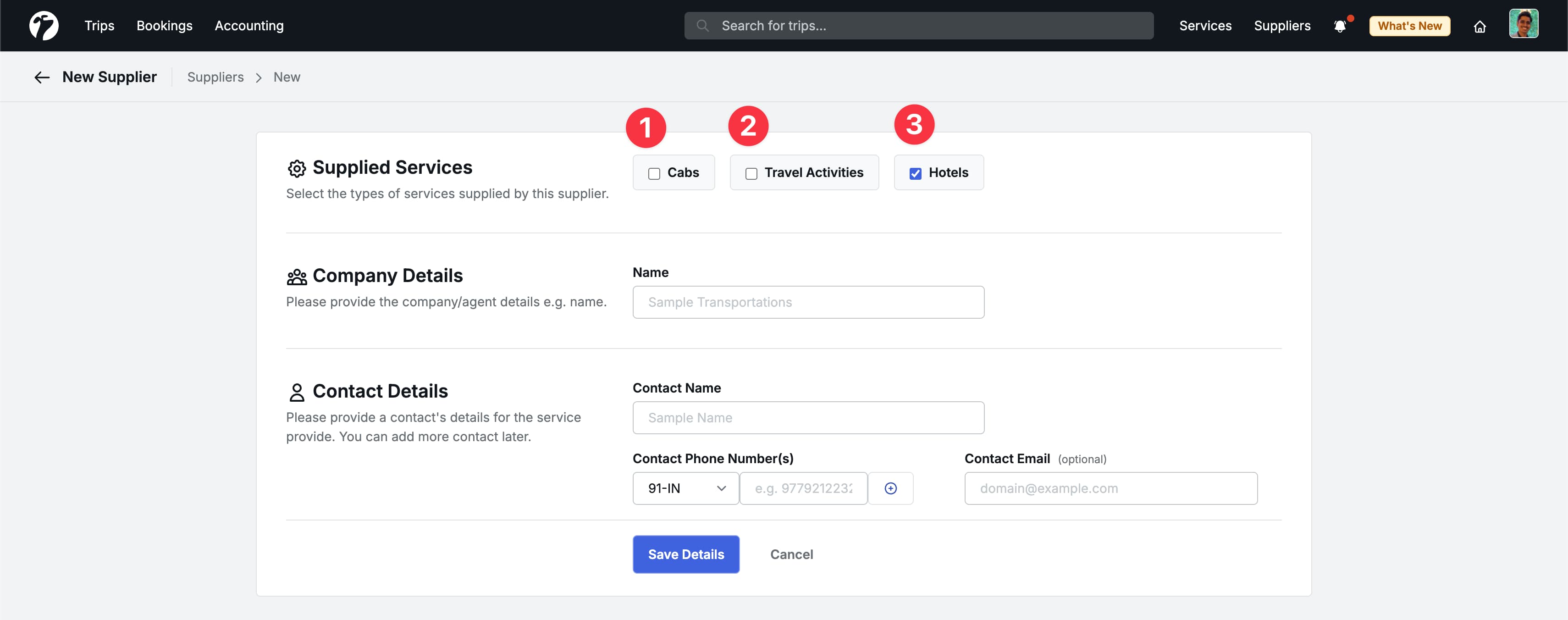
If a supplier provides multiple services (for example, Hotels and Transfers), you can create a single supplier and assign all applicable services to it.
-
Each supplier’s page shows all related bookings and services in one view, making day-to-day tracking easier.
Consolidated supplier view
-
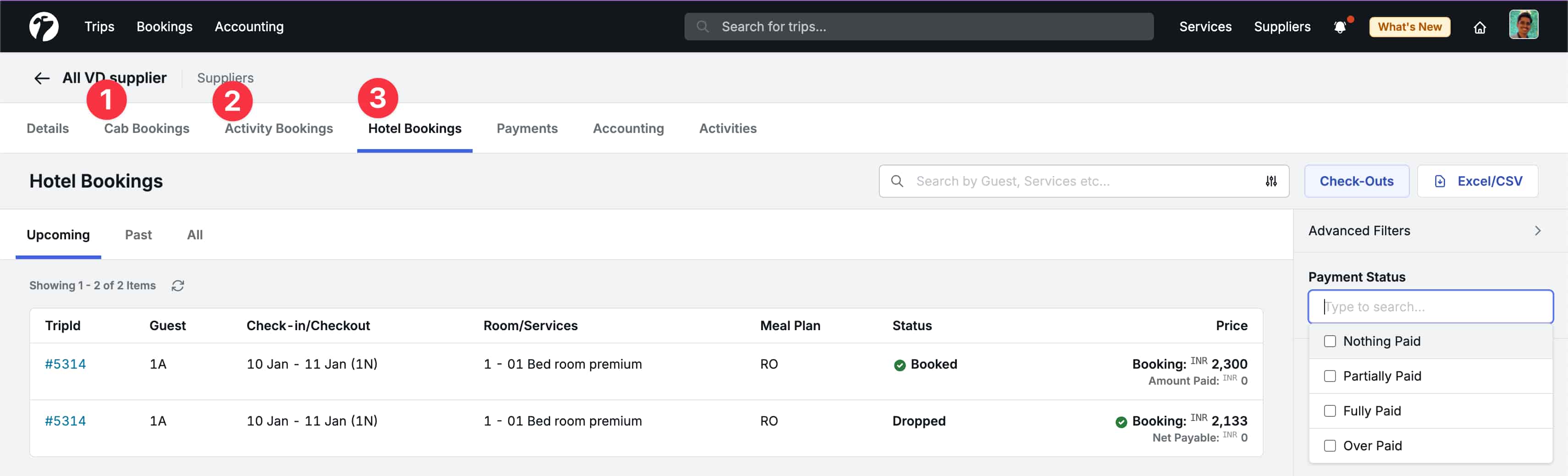
Suppliers now have a combined overview of bookings across different service types.
-
For Direct Hotel bookings, the hotel’s detail page acts as the supplier view, showing both direct bookings and bookings handled through third-party suppliers for that hotel.
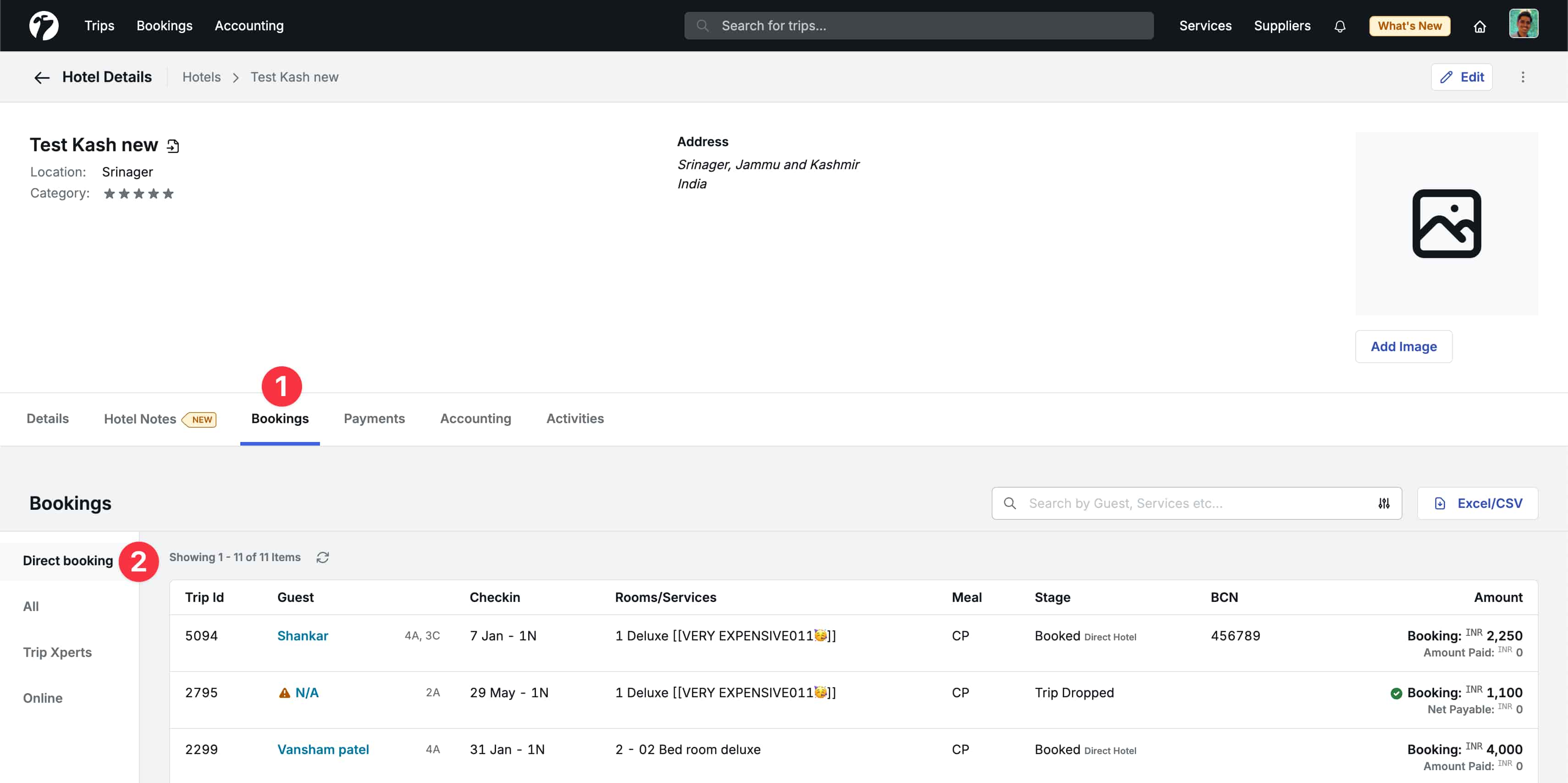
This unified approach simplifies supplier management and improves visibility across reservations and operations workflows.
Bulk Sales Person Assignment in Trips
We have added a new bulk assignment feature to make it easier for Admins to manage sales ownership across multiple trips.
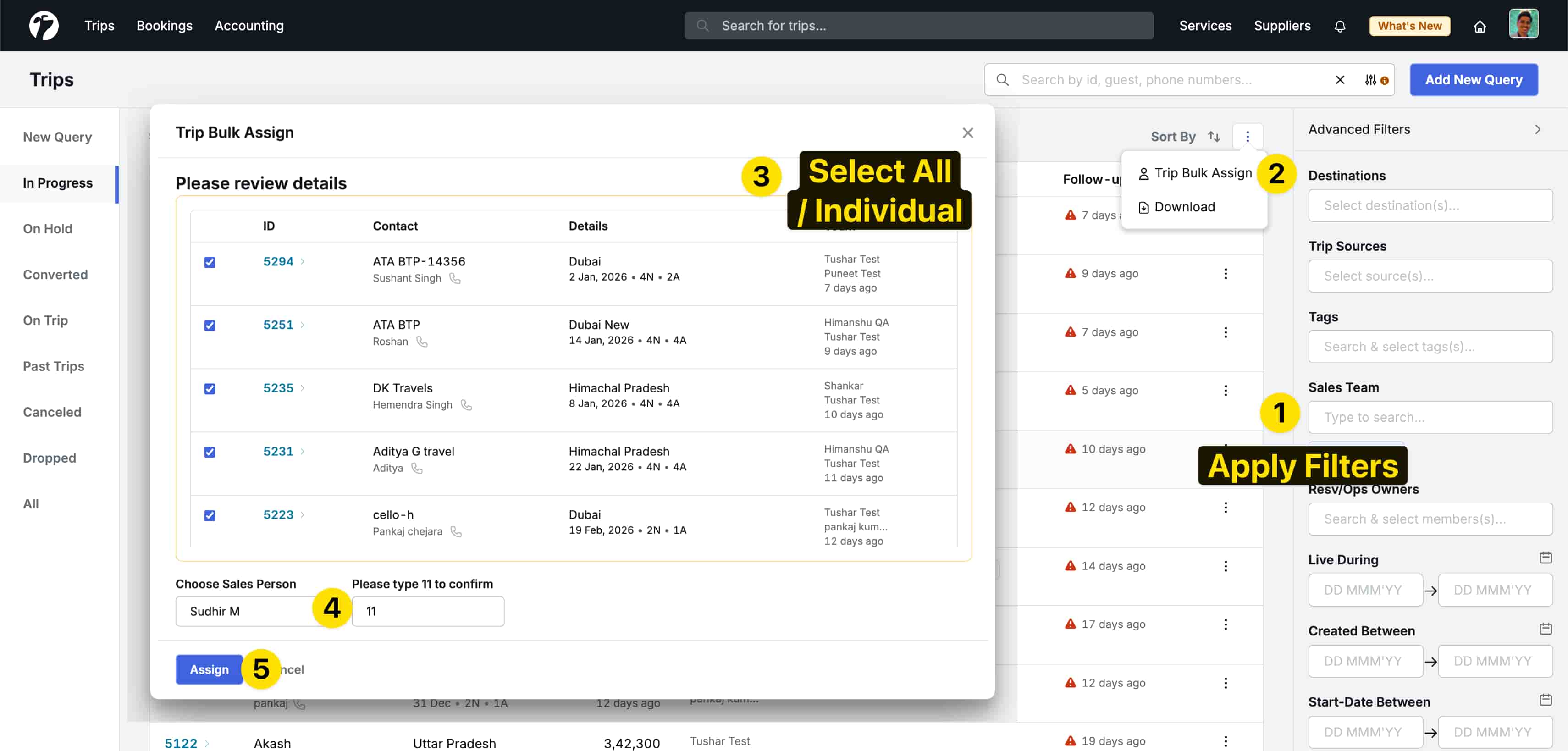
Assign trips in one go
- Admins can now assign or change the Sales Person for multiple trips at once.
- Trips can be selected using different filters such as current sales person, destination, or trip creation period.
Useful for team changes
- This feature is especially helpful during role changes, exits, or team restructuring, where trips need to be reassigned quickly.
- It can also be used for regular workload balancing across the sales team.
Improved trip filters
-
The existing Owners filter has been split into two separate filters:
- Sales Team
- Reservations / Operations Team
-
This makes it easier to find the right set of trips before performing bulk assignments.
Overall, this update reduces manual effort and gives Admins better control when managing trip ownership at scale.
Improved Sales and Profit Reports
We have improved the Sales and Profit Reports to provide clearer visibility into trips across different stages and outcomes.
Better visibility across trip status
- Reports now include more details for updated trips after conversion as well as dropped trips.
- This helps teams better understand how trips have progressed and where changes have occurred over time.
Improved handling for dropped trips
- The Trip Profit Report has been updated to better handle dropped trips that include multiple booking components.
- When the system is unable to prepare a report, clear and simple messages will be shown to explain the reason.
Clearer guidance when data is incomplete
- In cases where required booking or quote details do not match, or where certain information is missing, the report will clearly highlight the issue.
- Common examples include mismatches between quote and booking details, or incomplete booking information for dropped trips.
These updates make the reports easier to understand and help teams quickly identify and resolve gaps without digging into complex details.
Enhanced Price-Syncing between Quote and Bookings
We have improved the way prices are synced between Quotes and Bookings to reduce manual adjustments after a trip is converted.
Automatic updates for pending bookings
- For bookings that are initialized but not yet assigned to a supplier, the booking price will now update automatically.
- Prices are adjusted based on the latest converted quote and the applicable booking rates.
Fewer manual corrections
- This update helps ensure that booking prices stay in line with the most recent quote changes.
- It reduces the need for teams to manually review and correct prices after conversion.
Overall, this improvement helps keep quote and booking prices aligned as trips move from planning to execution.
Other Improvements
-
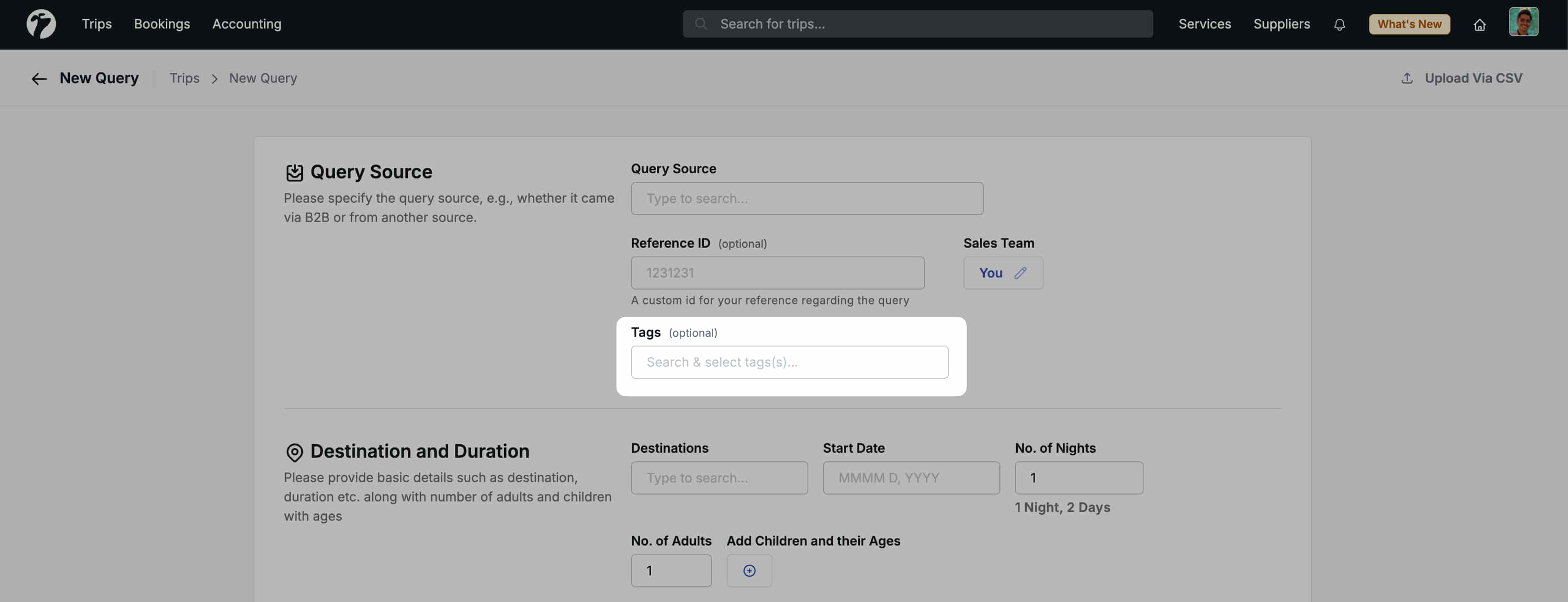
Sales persons can now attach tags to new trips during creation. Previously, tags could only be added after creating the trip.
-
You can now use any special characters in passwords to create stronger passwords. Earlier, only a limited set of special characters was allowed.
-
Entry Type (Manual or Via-Sheet) is now shown on the Hotel Bookings page for clearer visibility of how a booking was entered.
-
Fixed an issue with flight departure and arrival times where airport timezones changed incorrectly during daylight-saving periods.
-
The software update message now clearly highlights
ctrl+shift+r(Windows/Linux) andcmd+shift+r(Mac) to force an update when breaking changes are applied. -
Cab types are now listed alphabetically for easier selection.
-
A user’s activity across different modules linked to a trip is now recorded in the Trip’s activity tab, helping track sensitive changes and support audit discussions.
-
Added “computer generated” disclaimer to payment receipts.
-
Flight price details are now included in Quote Emails when using item-wise price breakdowns.
-
Hotel Check-In/Out Excel downloads now show
N/Ainstead of0to clearly indicate unavailable sales rates.