







Real-Time Global Exchange rate with Markup Percentage
Get hourly refreshed live exchange rates in your quotations and payment collections with configurable markup support. The Global Exchange Rate Converter automatically fetches the latest exchange rates via API, applies your predefined markup, and updates currency values automatically. This eliminates the need for manual exchange rate updates while ensuring accurate multi-currency quotations and payments.
Access via: Organization → Settings → Currencies → Exchange Rates
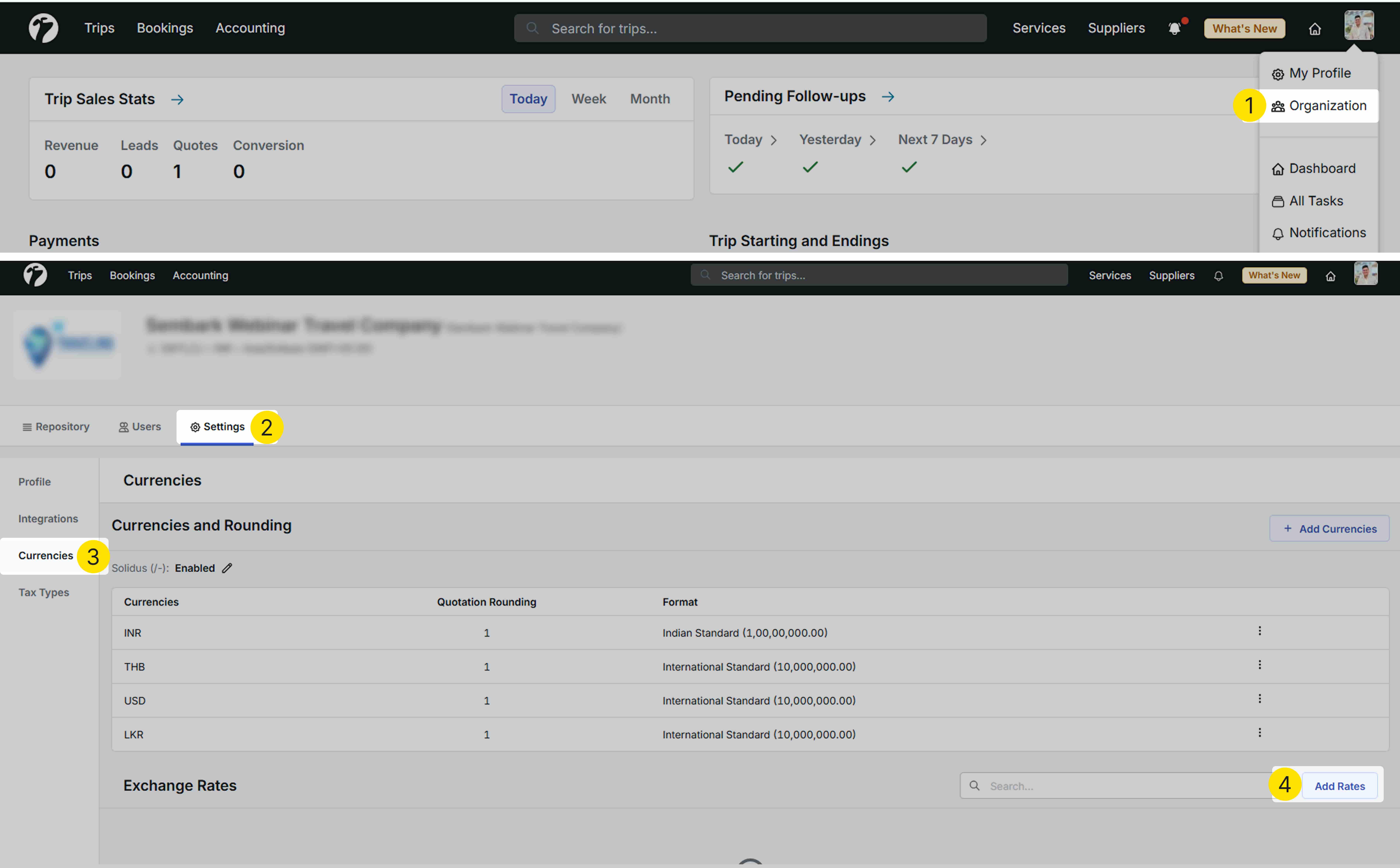
How It Works
You can now configure exchange rates in two ways:
1. Global Exchange Rate (Recommended)
Use live exchange rates with automatic markup.
- Select the From/Base Currency.
- Select the To/Counter Currency.
- Leave the Exchange Rate field blank.
- Enter the required value in the Default Markup field.
- Click Save.
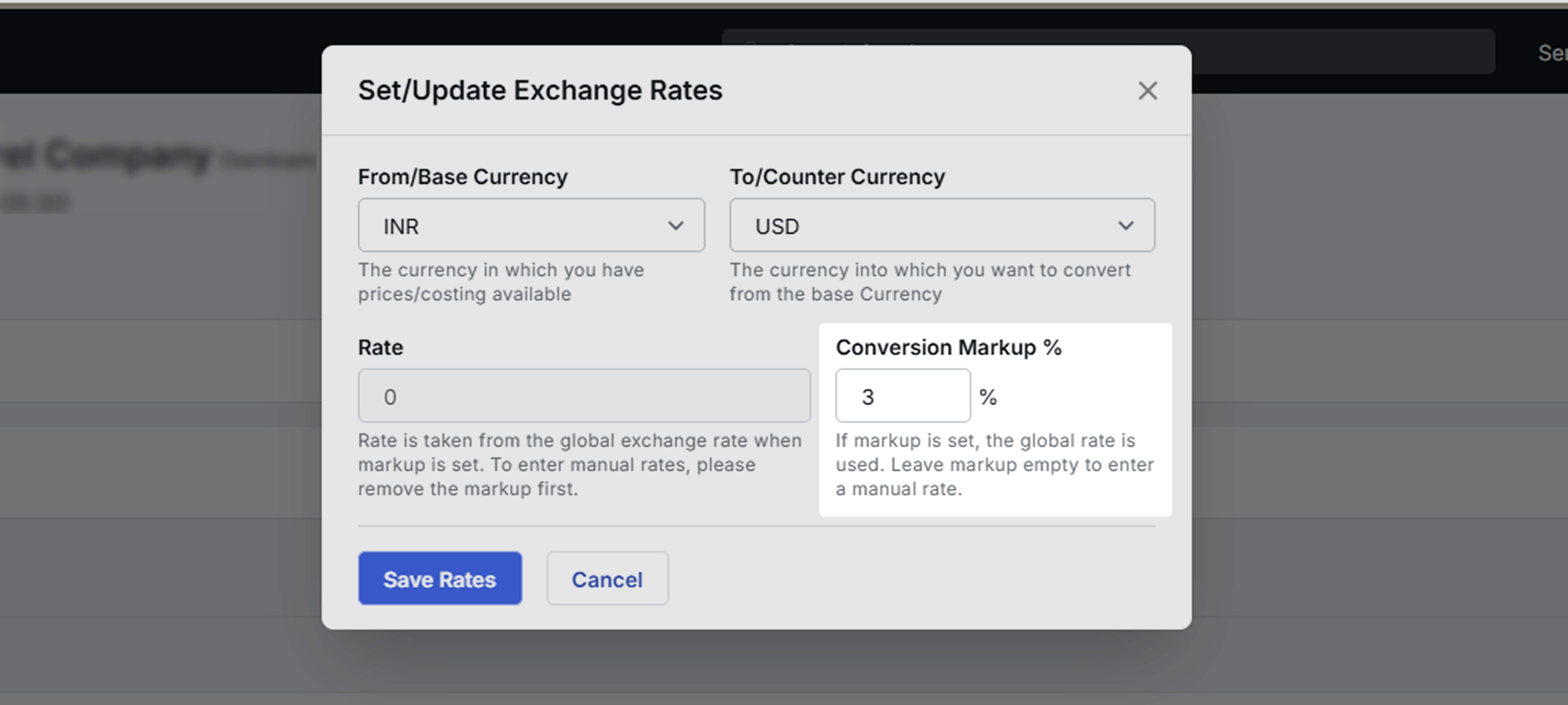
The system will automatically fetch the latest exchange rate and apply the configured markup. The calculated rate will be used throughout the quotation process.
2. Custom Exchange Rate
To use your own exchange rate:
-
Select the required currencies.
-
Enter the value in the Exchange Rate field.
-
Click Save.
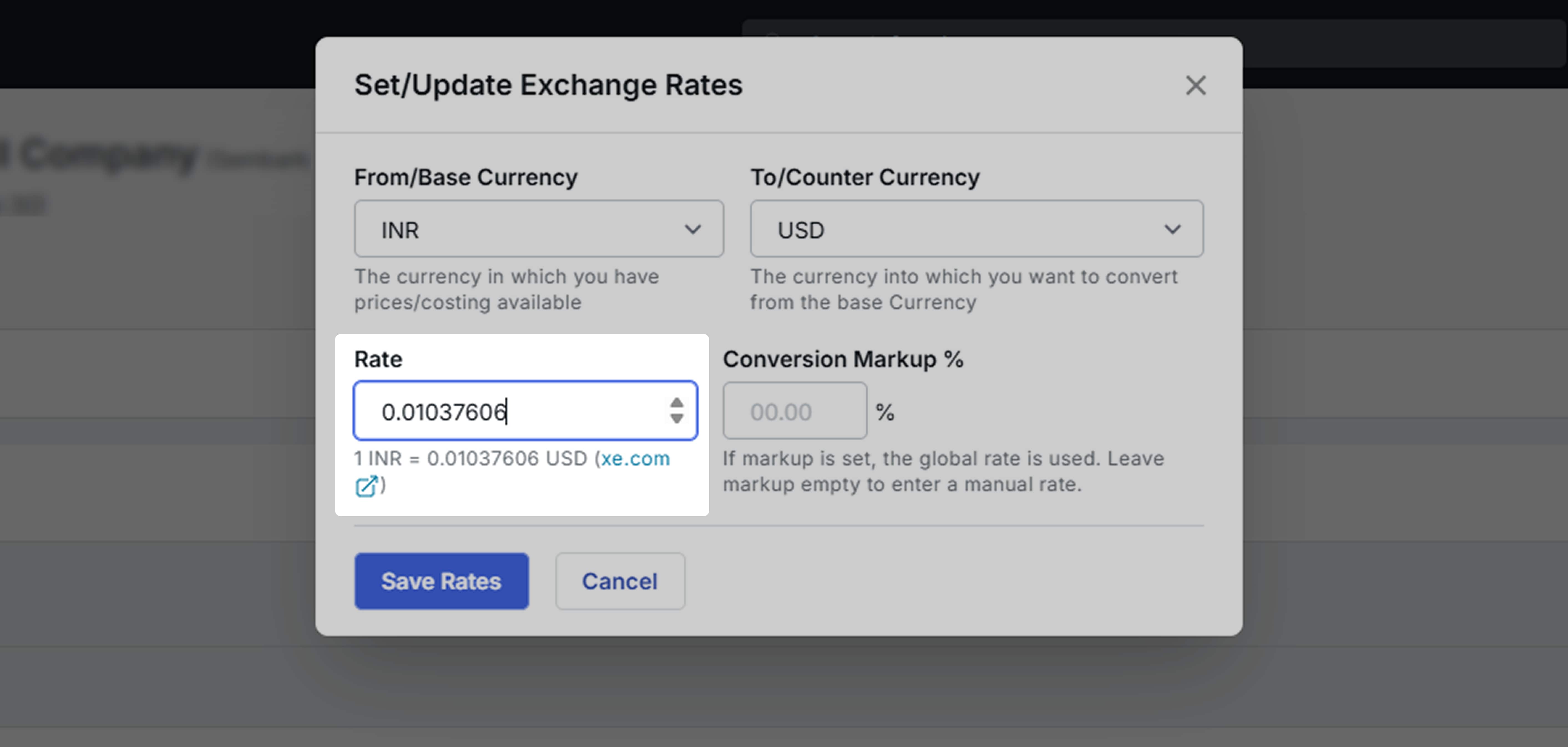
The system will continue using the manually entered exchange rate, just as before.
Key Benefits
- Automatically fetches real-time exchange rates via API.
- Applies the configured default markup automatically.
- Eliminates the need for manual exchange rate updates.
- Ensures quotations always use the latest exchange rates.
- Supports both live and manually configured exchange rates based on your business requirements.
2. Multi-Currency Payment Gateway with Real-Time Exchange Rates
Indian travel companies can now collect online payments for packages sold in foreign currencies. When an Indian customer makes a payment, the system automatically converts the amount to INR using the latest live exchange rate and the configured markup.
This feature also supports installment payments, where each installment is calculated using the latest exchange rate available at the time of payment.
How It Works
Previously, if a package was sold in a currency other than INR, payment gateway links could not be generated for Indian customers.
With this update, travel companies can sell packages in any supported currency. When an Indian customer makes a payment through the payment gateway, the system automatically converts the payable amount into INR using the latest exchange rate and the configured markup.
For every payment, the system:
- Fetches the latest live exchange rate.
- Applies the configured default markup.
- Converts the payable amount into INR.
- Processes the payment using the calculated INR value.
For installment payments, the same calculation is performed each time a payment is made, ensuring the amount always reflects the latest exchange rate.
Conditions
This feature is available only when:
-
The payment is made by an Indian customer.
-
The customer is identified as Indian using either:
- An Indian mobile number (+91), or
- Indian nationality in the customer profile.
-
Real-Time Global Exchange Rates are enabled and configured in Organization → Settings → Currencies.
Key Benefits
- Automatically converts foreign currency payments into INR.
- Supports real-time exchange rate calculation for every installment payment.
- Ensures customers always pay the correct INR amount based on the latest exchange rate.
3. Same-Day Cab & Driver Assignment Warning
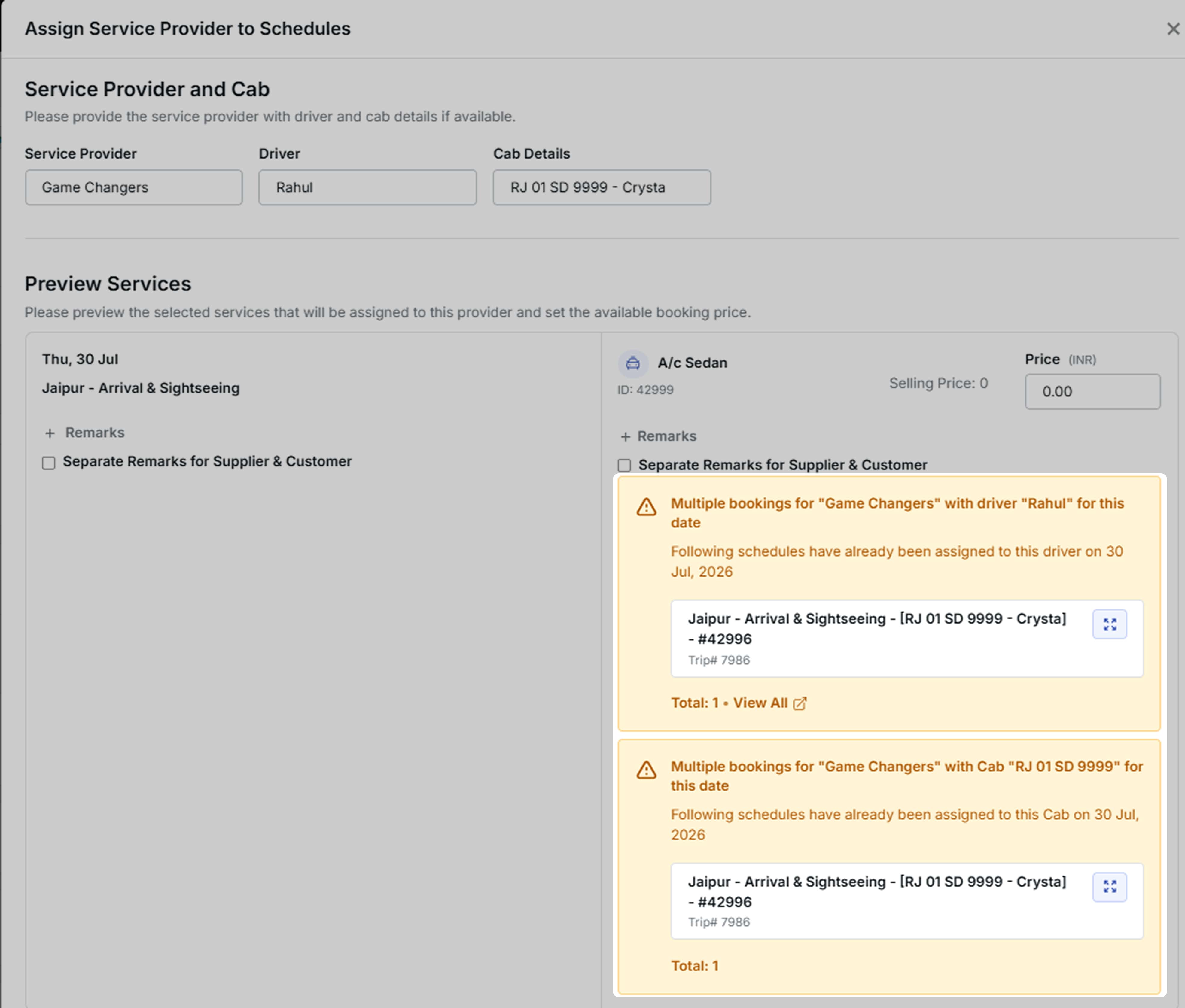
The Cab Schedule module now validates both drivers and cabs during supplier assignment to help prevent scheduling conflicts. If the selected driver or cab is already assigned to another trip on the same date, the system displays a warning before the assignment is completed.
How It Works
Previously, the system displayed a warning only when the selected driver was already assigned to another trip on the same day.
With this update, the same validation has been extended to cabs.
Now, whenever you assign a supplier in the Cab Schedule, the system automatically checks whether the selected driver or cab is already assigned to another trip on the same date.
If a conflict is found, a warning message is displayed, allowing you to review the assignment before proceeding.
Note: This is a warning message only. You can still continue with the assignment if required.
Key Benefits
- Prevents duplicate driver assignments on the same day.
- Identifies cab scheduling conflicts before confirmation.
- Reduces operational errors and scheduling issues.
- Improves fleet and driver management.
- Helps operations teams allocate resources more efficiently.
4. Separate Customer & Supplier Remarks in Cab Schedules
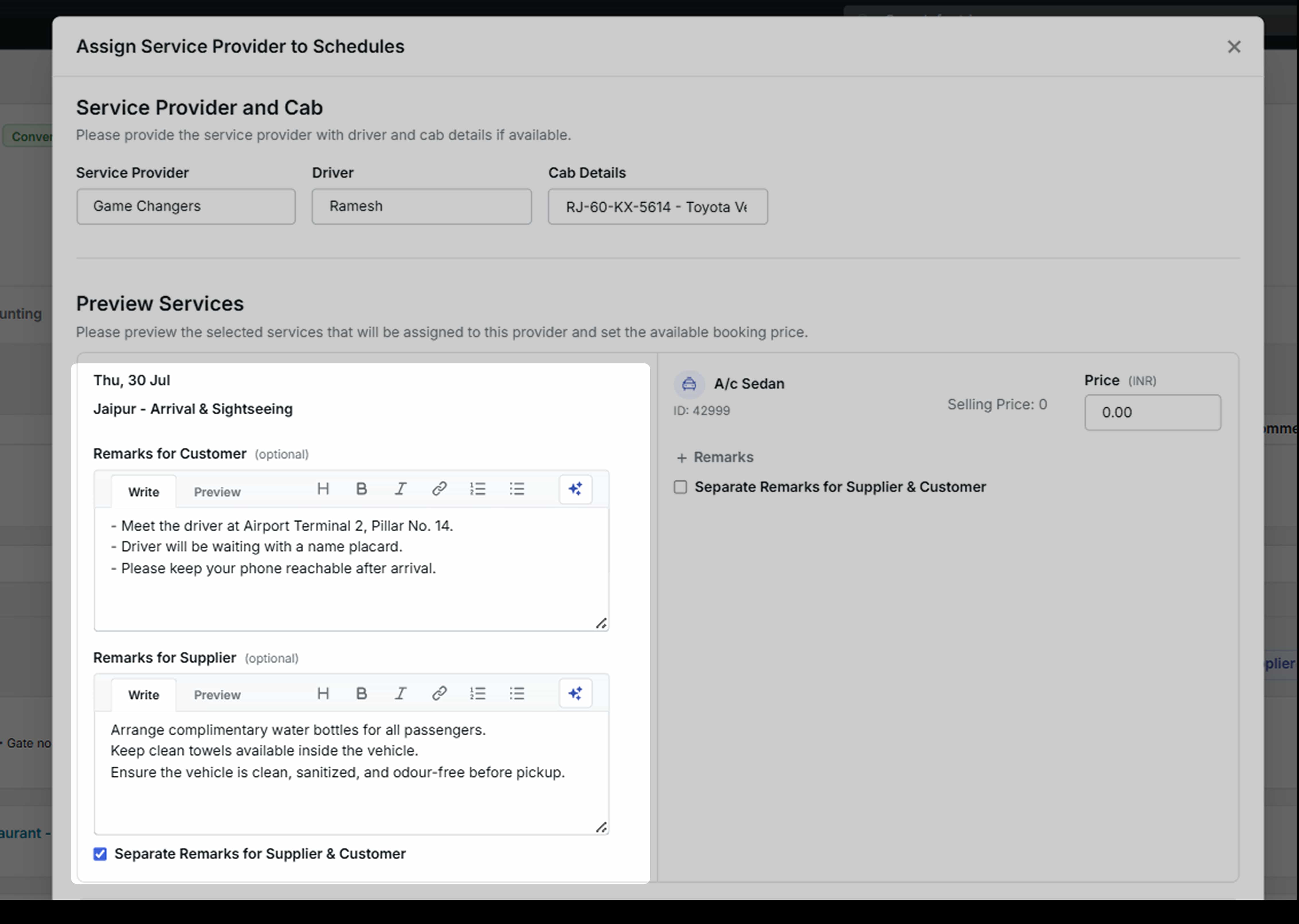
The Cab Schedule module now allows you to maintain separate remarks for customers and suppliers. This helps you share customer-specific information with travellers while keeping internal operational instructions visible only to suppliers and drivers.
Access via: Trips → Converted Trips → Service Bookings → Update Timings → Remarks
How It Works
Previously, the system had a single Remarks field for both customers and suppliers. This meant the same remarks were shared with everyone, including internal operational notes that were not intended for customers.
With this update, two separate remark fields are available:
- Customer Remarks – Used for information that should be shared with the customer.
- Supplier Remarks – Used for operational instructions and notes meant only for the supplier or driver.
When sharing documents, the system automatically displays the appropriate remarks based on the recipient, ensuring customers and suppliers receive only the information relevant to them.
Key Benefits
- Keeps internal operational notes hidden from customers.
- Shares only customer-specific information with clients.
- Improves communication with suppliers and drivers.
- Reduces the risk of exposing internal instructions in shared documents.
- Makes cab schedule communication more organised and professional.
Other improvements:
1. Enhanced Trip Plan Request Distribution Rules
The Trip Plan Request (TPR) Distribution Rules have been enhanced to provide more flexible user assignment.
What’s Changed
Previously, when creating a TPR distribution rule, you first selected one or more roles. Only users belonging to those selected roles could be assigned to the rule.
With this update, you can now assign the rule to any individual team member, regardless of their role. The selected role is no longer a restriction for user selection.
The selected roles now act as a fallback group. If none of the individually selected users are available to receive the request, the system automatically assigns the request to an eligible user from the selected roles.
The Exclude Users functionality continues to work as before.
Benefits
- Assign TPR rules to any individual team member, irrespective of their role.
- Greater flexibility when configuring distribution rules.
- Automatic fallback to the selected roles when individually assigned users are unavailable.
- Preserves the existing user exclusion behaviour.
2. Improved IMAP Synchronization for Large Emails
The IMAP synchronization process has been updated to improve the handling of large email messages.
What’s Changed
- Email messages with a body size greater than 10 MB are now deferred during the initial synchronization.
- Deferred messages are downloaded automatically in the background or when accessed on demand.
- This enhancement primarily applies to emails containing large inline images.
- Attachments are not downloaded during IMAP synchronization and do not contribute to the email body size.
This update helps optimize the email synchronization process while maintaining access to large email messages when required.